Lesson 1-9 · Variables & Expressions
Lesson 1-9 · Variables & Expressions
Teacher mode is on. Toggle it off (bottom-right) to preview the student view.
You've already written a line like this one:
drivetrain = DifferentialDrive.get_default_differential_drive()
without anyone explaining the =. That single character is doing something
specific, and once you see what, a lot of Python stops being mysterious. This
lesson is about the two halves of that line: the value on the right, and the
place it gets stored on the left.
No robot needed today. Everything here runs in XRP Code's terminal with
print(), which makes it the fastest lesson in the module to check your own work.
Learning Objectives
By the end of this lesson you will be able to:
- Explain what
=does — work out the right side, then store the result in the named memory location on the left - Reassign a variable, including using its own old value
- Name variables the way Python programmers do, and say why
Rangefinderandrangefinderare different things - Predict the value of an arithmetic expression using operator precedence, and use parentheses to change it
A named place in the robot's memory
Your robot's controller has memory — physical storage on the board, the same way a phone or a laptop has memory. Memory is a long bank of locations, and each location can hold one value. A variable is one of those locations with a name that you chose, so your program can put something there and find it again later.
Think of the wall of boxes at a post office. They sit in one long bank, they all work the same way, and each one has its own number on the front. You can look at what's in a box, put something in it, or replace what's there with something else — and only the clerk behind the wall ever reaches in. On the controller the clerk is the processor, the chip that runs your program: nothing goes into a location or comes out of one except through it.
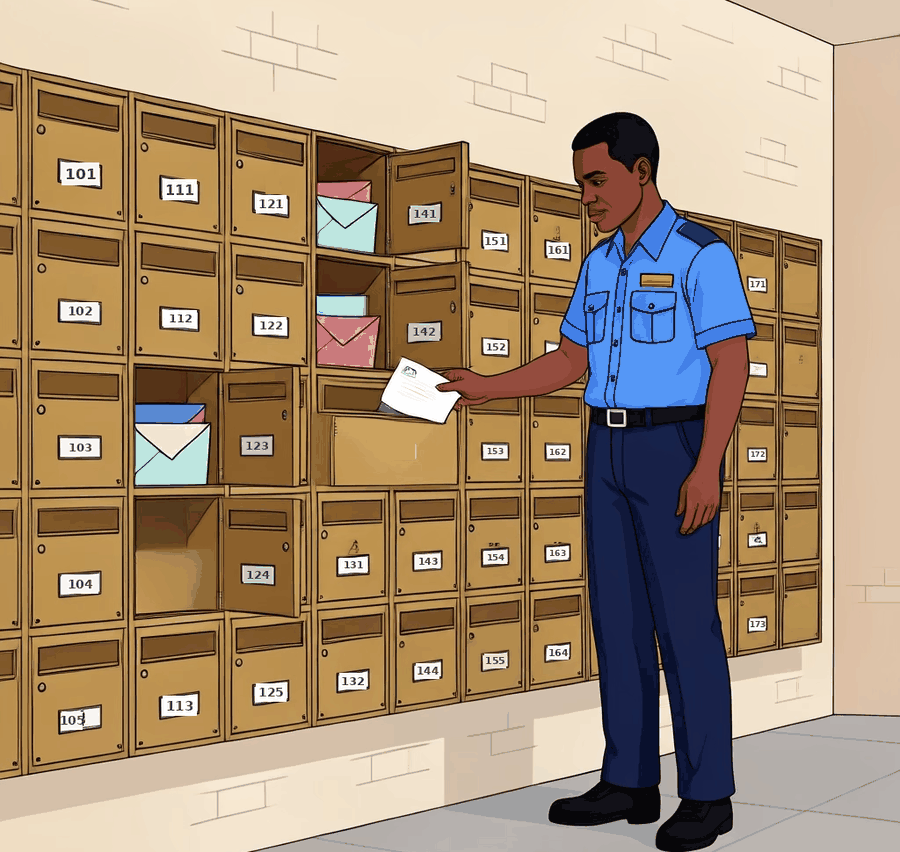
You claim a location and put something in it by writing a name, an =, and a value:
side_length = 30
robot_name = "Bolt"
threshold = 0.5
After those three lines the controller's memory has three named locations: one
holding 30, one holding "Bolt", one holding 0.5.
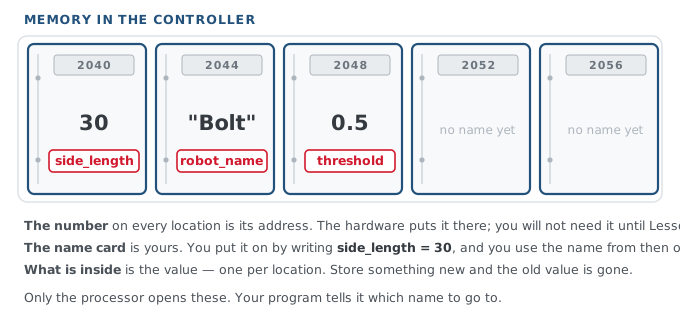
Those numbers on the plates are real. Every location in memory has one, called its address, and it's there whether or not anything has been stored — exactly like the number on a post office box. You won't need addresses for a long time, because the name is what you use. They come back in Lesson 4-7, where they turn out to explain something surprising about lists.
The = is not the equals sign from math class. In math, x = 5 is a claim that
two things are the same. In Python it's an instruction — "store this here" — and
it runs in a specific order:
Work out whatever is on the right. Then store that result in the location named on the left.
Right side first, every time. That order is the whole reason this line works:
side_length = 20 + 5 # Python works out 25, THEN stores 25 in side_length
The location doesn't hold "20 + 5". It holds 25. The arithmetic happens first and
is finished before anything is stored.
What is the difference between = in math and = in Python?
Storing something new overwrites what was there
The word variable means it can vary. Store a new value in the location and the old one is overwritten — a location holds exactly one value, so the new one takes the old one's place and the old value is gone:
side_length = 30
side_length = 45      # the 30 in that location is overwritten; it now holds 45
This is also what makes the strangest-looking line in programming straightforward:
count = 0
count = count + 1     # read count (0), add 1, store 1 back in count
count = count + 1     # read count (1), add 1, store 2 back in count
Work that first count = count + 1 in order, right side first. The processor goes
to the location named count and reads what's in it — 0. It adds 1, giving 1.
Then it stores that 1 back in count, overwriting the 0. The same location is
used twice in one line: read from on the right, written to on the left.
Read it as "count becomes count plus one," never as "count equals count plus one" — as a claim about equality it's nonsense, which is exactly why reading it that way confuses people. You'll write this exact pattern in Module 2 to count intersections as the robot drives over them.
After these three lines, what is total?
total = 10
total = total + 5
total = total + 5
Choosing names
Python lets you name a variable almost anything. Programmers have settled on conventions anyway, because code gets read far more often than it gets written.
The style for variables is snake_case: all lowercase, words joined by
underscores. You've already been following it — side_length in your Blockly
function was chosen in Lesson 1-4 to be the name you'd want in Python later.
side_length = 30       # yes
base_effort = 0.5      # yes
sideLength = 30        # works, but not the Python style
SideLength = 30        # works, but this looks like a class (see below)
s = 30                 # works, but what is it?
Descriptive beats short. threshold tells the next person — including you, three
weeks from now — what the number means; t doesn't. The exception is a loop
counter like i, which you'll meet in the next lesson and which everyone
recognizes.
In the line reflectance = Reflectance.get_default_reflectance() what is the difference between the two spellings?
Working out the value: expressions
Anything Python can work out into a single value is an expression. 25 is an
expression. So is 20 + 5, and so is side_length * 2. Expressions are what go
on the right of an =, inside parentheses when you call something, or anywhere
else a value belongs.
The arithmetic operators are the ones you'd expect:
7 + 2      # 9
7 - 2      # 5
7 * 2      # 14
7 / 2      # 3.5
7 % 2      # 1   (the remainder after dividing)
Two of them are spelled differently from the way you'd write them by hand. Multiply
is an asterisk *, not a × sign, and divide is a forward slash /, not a ÷ sign —
neither of those symbols is on a keyboard, which is why every programming language
picked something else. The last one, %, is remainder, not percent: 7 % 2 is
what's left over when 2 goes into 7. You won't need it until Module 2, where it's the
trick for doing something "every 50th time around a loop."
Variables can appear anywhere a number can, because by the time Python does the arithmetic, the variable has already been replaced by its value:
sides = 6
turn_angle = 360 / sides     # right side: 360 / 6 = 60.0
Precedence: which operator goes first
When one expression has several operators, Python doesn't just work left to right.
It uses the same precedence rule you learned in math: * and / happen before
+ and -.
20 + 2 * 5 # 30, not 110 -- the 2 * 5 happens first
That isn't a trivia question. Here's a line you'll write in the very next lesson, to make each square in a nest bigger than the last:
size = 20 + square * 5 # square counts 0, 1, 2, 3 -> size is 20, 25, 30, 35
It only produces 20, 25, 30, 35 because square * 5 is worked out first and then
added to 20. If Python went strictly left to right, 20 + square would come first
and the sizes would be wrong.
Parentheses beat everything. Put brackets around the part you want done first, and it is:
(20 + 2) * 5 # 110 -- now the addition goes first
You'll need this in Module 2, where the threshold that tells the robot line from floor is the midpoint of two readings:
threshold = (white_reading + black_reading) / 2
Drop those parentheses and you get white_reading + black_reading / 2, which
halves only the black reading and hands back a threshold that's nowhere near the
middle. The robot still runs. It just reads the line wrong, which is a far more
annoying kind of mistake than a crash.
What is the value of 10 + 4 * 2 ?
Your white reading is 0.2 and your black reading is 0.8, and you want the midpoint (0.5). Which line gives it?
Activity · Predict, then print
No robot for this one. Open XRP Code, start a new program, and work through the list on paper first — write your predicted value next to each line, then run it and compare.
- Write your predictions for all six of these, then type them in and check:
print(3 + 4 * 2)
print((3 + 4) * 2)
print(10 / 4)
print(10 - 2 - 3)
print(2 * 3 + 4 * 5)
print(100 / 10 / 2)
- For any of the examples you got wrong, work out why before moving on. Write out the order Python used, one step at a time.
- Now predict and check this sequence — the accumulator pattern:
count = 0
count = count + 3
count = count * 2
print(count)
- Set
sides = 8and write one line that prints the turn angle for an eight-sided shape. (You worked this out in Lesson 1-5 with blocks.) - Challenge: two readings,
white = 0.25andblack = 0.75. Write one line that prints the midpoint. This is the real calculation you'll make in Module 2, with your own robot's readings.
Real-world connections
Naming a value and working out a new one is most of what any program does:
Score and health
score = score + 100 after a pickup is the same accumulator you just wrote.
Totals and tax
Checkout code is a stack of expressions — subtotal, discount, tax, total — each named so the next line can use it.
Sensor math
Every instrument converts a raw reading into a real measurement with arithmetic like this, parentheses and all.
Wrap-up
- What are the two steps Python takes on a line like
size = 20 + 5? (Work out the right side, then store the result in the location namedsize.) - How can
count = count + 1make sense? (Read what's in the location, add 1, then store the result back in the same location, overwriting what was there.) - Which happens first in
3 + 4 * 2, and how would you change it? (The multiplication; use parentheses.) - What's the difference between
Rangefinderandrangefinder? (Capitalized is the class; lowercase is your variable.)