Lesson 1-10 · Python Loops
Lesson 1-10 · Python Loops
Teacher mode is on. Toggle it off (bottom-right) to preview the student view.
Remember the Repeat block that made shapes so much shorter? Python has the
same tool: the for loop. In this lesson you'll write loops in text and use
them to draw the shapes you already know — proving the logic is identical, only
the syntax changed. You'll also collect the two syntax rules Lesson 1-8 promised
and didn't deliver, because a loop is the first thing you've written that has an
inside. Then you'll do something Blockly made awkward: put a loop inside another
loop.
Learning Objectives
By the end of this lesson you will be able to:
- Write a Python
forloop and use it to repeat robot commands - Explain what
range(n)produces and why counting starts at0 - Apply the last two of Python's five syntax rules — colons and indentation — to say exactly what's inside the loop
- Nest one loop inside another, using the outer counter to change what the inner loop draws
The Repeat block, in text
Here's the square you drew in Lesson 1-2 as a Blockly Repeat — and the Python for
loop that does the same thing:




for i in range(4):
    drivetrain.straight(30)
    drivetrain.turn(90)
Breaking down that first line:
for— the keyword that starts a loop.i— a counter variable (you can use it or ignore it).range(4)— produces the numbers0, 1, 2, 3— four of them.:— required. More on that in a moment.
The two syntax rules you were promised
Remember Lesson 1-8 saying there were five syntax rules, and then only showing you three? Here are the other two. They were held back because they'd have been meaningless then: every program in that lesson was a flat list of one-line instructions, and these two rules exist to answer a question that list never raised — which lines belong to which?
The for loop is the first thing in this course that has an inside. So:
- Colons — a
:ends any line that opens a block.for i in range(4):is a promise that lines belonging to this loop follow.ifanddefdo the same, which you'll see soon enough. - Indentation — the spaces at the start of a line say what's inside the block the colon opened. Indented means in; back at the margin means out.
Most languages use curly braces { } for this and treat indentation as a courtesy
to whoever reads it next. Python took the braces away and made the indentation
itself the rule, so the shape of the code on the page and what the code actually
does can never disagree. That's a real advantage — and it also means a stray space
is a genuine error, not a style nitpick.
What's wrong with this line? for i in range(4)
What numbers does range(4) produce?
Indentation decides what repeats
Rule 5 in action. Compare these two programs — the only difference is where one line starts:
for i in range(4):
    drivetrain.straight(30)
    drivetrain.turn(90)
print("Square complete!")     # NOT indented -> runs once, after the loop
The two indented lines repeat four times; the print runs once at the end because
it's not indented.
In the code above, how many times does print("Square complete!") run?
Use the counter
The loop variable isn't just for counting — you can use it. Say you want the
robot to report which side it's drawing as it goes. You already know print(),
and print() will take several things at once if you separate them with commas:
for i in range(5):
    print("Drawing side", i + 1, "of 5")
    drivetrain.straight(20)
    drivetrain.turn(72)
Python prints each item in turn and puts a space between them:
Drawing side 1 of 5
Drawing side 2 of 5
Drawing side 3 of 5
...
We use i + 1 so the messages read "1, 2, 3…" instead of "0, 1, 2…" — range(5)
counts from 0, but people count from 1.
That works. Now here's the same message written a second way:
for i in range(5):
    print(f"Drawing side {i + 1} of 5")
    drivetrain.straight(20)
    drivetrain.turn(72)
Run it and the output is identical. The text in quotes is an f-string (the
f is for formatted): one piece of text with a slot in it, where Python drops
in the value of i + 1.
The rules for f-strings
- Put an
fright before the opening quote —f"…", with no space between them. - Curly braces
{ }mark a slot. Python works out whatever is inside the braces and puts the answer into the text at that spot. It can be a variable ({i}), a calculation ({i + 1},{360 / 5}), or anything else that produces a value. - Everything outside the braces is printed exactly as you typed it, spaces and punctuation included. Python adds nothing.
- You can have as many slots as you like in one f-string:
f"Side {i + 1}: drive {length} cm, turn {angle} degrees". - Forget the
fand the braces stop working. Without it,"Drawing side {i + 1} of 5"is ordinary text, and Python prints the braces and the words inside them literally —Drawing side {i + 1} of 5, five times. If you ever see curly braces in your output, look for a missingf.
i is 2. What does print("Side {i + 1}") show?
Why bother, if commas already work?
For a short message the two are interchangeable. F-strings win as the message grows, for three reasons.
You can read it. An f-string looks like the line it will print. The comma version is chopped into pieces, and you have to assemble it in your head — especially once there are several values:
print("Side", i + 1, "- drive", length, "cm, turn", angle, "degrees")
print(f"Side {i + 1} - drive {length} cm, turn {angle} degrees")
You control the spacing. Commas always put a space between items, whether
you want one or not. Try printing a fraction like 1/5:
print("Side", i + 1, "/", 5)     # Side 1 / 5
print(f"Side {i + 1}/5")         # Side 1/5
There's no way to make the comma version print 1/5 — the spaces come with the
commas. In an f-string, the only spaces are the ones you typed.
It's a value, not just a printout. Commas only mean "several things" inside
print(). An f-string is a complete piece of text you can store in a variable and
use later:
message = f"Drawing side {i + 1} of 5"
print(message)
You'll lean on that later in the course, along with a few extra tricks f-strings have — like rounding a long sensor reading to two decimal places as you print it.
You want a loop to run 6 times to draw a hexagon. What goes in the range?
Try these: write loops to draw a triangle (range(3), turn 120) and a pentagon
(range(5), turn 72). Add a print() inside each so you can watch the progress.
A loop inside a loop
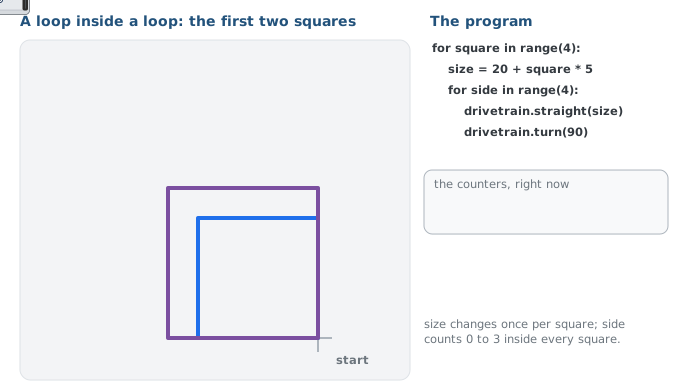
New problem: draw four squares, each bigger than the last — 20 cm, then 25, then 30, then 35.
You already know how to draw one square with a loop. So you could write that loop four times, changing one number in each copy… and you know where that goes. In Lesson 1-2, the answer to "the same thing, over and over" was a loop. It still is. The only difference this time is that the thing being repeated is itself a loop.
from XRPLib.defaults import *

board.wait_for_button()

for square in range(4):          # outer loop -- one pass per square
    size = 20 + square * 5       # 20, 25, 30, 35
    for side in range(4):        # inner loop -- one pass per side
        drivetrain.straight(size)
        drivetrain.turn(90)
Read it from the inside out. The inner loop is the square you already wrote:
four sides, four corners. The outer loop runs that entire square four times —
and this is the useful part, square counts 0, 1, 2, 3 as it goes, so
20 + square * 5 works out to a different size on every pass.
Indentation is doing real work here. size is indented once, so it belongs to the
outer loop and is recalculated once per square. The two drivetrain lines are
indented twice, so they belong to the inner loop and run four times per square —
sixteen sides in total.
Because a square finishes where it started, each new square sets off from the same corner as the one before it, so the four nest inside each other.
In the nested program above, how many times does drivetrain.straight() run in total?
What happens if you indent the size line twice, so it lines up with the drivetrain lines?
Activity · Draw a nest of squares
- Type the nested-loop program above and run it. Before you press the button, write down two predictions: the total distance the robot will drive, and how many turns it will make. Check them against what you see.
- Change it to draw six squares. What did you have to change — and what stayed the same?
- Challenge — make the squares shrink instead of grow, so the largest is drawn first. There are two ways to do it: change the arithmetic, or count down.
Real-world connections
Loops are how software handles "do this for every…" without endless copy-paste:
Feeds & lists
A social feed loops over posts, drawing each one with the same code.
Processing records
Analyzing a million rows is one loop that runs a million times — no extra code.
Sensor polling
Robots loop constantly: read sensors, decide, act, repeat — thousands of times a second.
Wrap-up
- What does
range(4)produce, and how many times does the loop run? (0,1,2,3— four times.) - What decides which lines are inside the loop? (Indentation.)
- In a nested loop, which loop runs more often — the inner one or the outer one? (The inner one: once per side, per square.)
- How did the outer loop change the size of each square? (Its counter was used in the arithmetic that set
size.)
Resources
- XRPLib Documentation
- XRP Code IDE — where you write both blocks and Python