Lesson 2-7 · Finishing the Sensor Toolkit
Lesson 2-7 · Finishing the Sensor Toolkit
Teacher mode is on. Toggle it off (bottom-right) to preview the student view.
Look at the LINE SENSOR section of robot.py. Without making a fuss about it, you've
built a toolkit: get_left() and get_right() since Lesson 2-1, is_either_on_line()
since the bounce, and a get_error() you've already rewritten once. Each one was
written when a program needed it and tested before that program ran. This lesson adds
the last function the module needs, puts a name to something those functions have been
doing all along — sharing reflectance and THRESHOLD without being handed them — and
tests the whole toolkit in one go, because from next lesson on the robot drives on it.
Learning Objectives
By the end of this lesson you will be able to:
- Write
is_at_cross(), completing the sensor toolkit —get_left(),get_right(),get_error(),is_either_on_line(),is_at_cross() - Explain how those functions share
reflectanceandTHRESHOLDthrough global variables - Say why one function calls another instead of repeating its logic
- Say when a function needs the
globalkeyword, and when it doesn't - Test the whole toolkit by sliding the robot over the line and reading the printout
The goal: code that reads like English
Here is where this is going. Next lesson the robot follows the line until it reaches a crossing line, and with the sensor logic in functions, that loop reads as a sentence:
while not is_at_cross():
    correction = get_error() * KP
    drivetrain.arcade(BASE_EFFORT, correction)
is_at_cross() is far clearer than left > 0.5 and right > 0.5 would be in the
middle of a loop, and get_error() says what the subtraction means. Every driving
function in Lessons 2-8 and 2-9 is built on these five — so this is the lesson to be
sure of them.
Shared, not passed: global variables
The functions need the same two things: the reflectance sensor, and the threshold.
You could have passed both into every function as parameters. Instead they were
created once, at the top of the file, outside any function — reflectance in the
start block, THRESHOLD at the top of the section — and every function just used them.
A variable created outside every function is a global variable: every function
below it in the file can read it without being handed it. You've been doing this since
Module 1 — drivetrain is a global that polygon() used without a parameter — and
Lesson 2-1 said so in passing; now it has a name.
THRESHOLD is in capitals by convention. That spelling says this is a setting, not a
value that changes as the program runs. Python doesn't enforce it; readers rely on it.
Why can get_left() use reflectance when it was never passed in as a parameter?
The last function: is_at_cross()
Your LINE SENSOR section has four functions. Here is the fifth — add it under
is_either_on_line():
def is_at_cross():
    # return True when BOTH readings are above THRESHOLD
    pass
What is it asking? Where a second taped line crosses the one you're following,
both sensors sit on black at once. The two is_ functions are a pair — at least one
dark (or), and both dark (and):
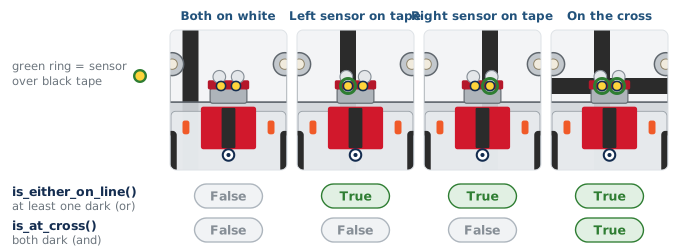
The first ends a turn in Lesson 2-9; the second ends a follow in Lesson 2-8.
Here is the toolkit now that it's whole:
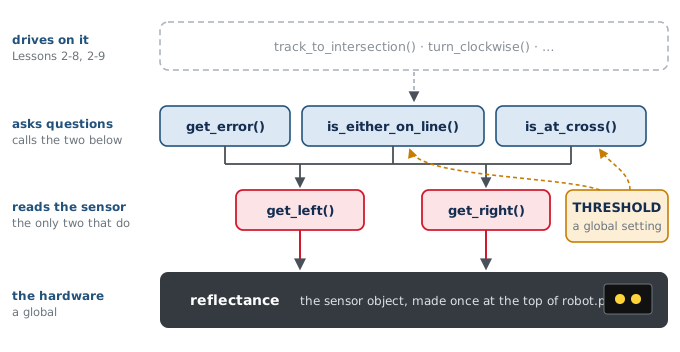
These five names are the vocabulary of the rest of the course — used, unchanged, through Module 5.
Which condition detects an intersection (both sensors on the line)?
Both sensors read 0.2 with THRESHOLD = 0.5. What do is_at_cross() and is_either_on_line() return?
Why does get_error() call get_left() instead of reflectance.get_left()?
When global is needed — and when it isn't
Every function above reads THRESHOLD, and none of them needed anything special.
Reading a global is free. Assigning to one is different. Try a function that
changes the threshold:
def set_threshold(new_value):
    THRESHOLD = new_value        # looks right; does nothing useful
Call set_threshold(0.3) and then print THRESHOLD — still 0.5. Inside a
function, assigning to a name creates a new local variable with that name, which
vanishes when the function returns. The global was never touched. To tell Python you
mean the one at the top of the file:
def set_threshold(new_value):
    global THRESHOLD
    THRESHOLD = new_value
That's the whole rule: read a global freely; to assign to it, declare global first.
You'll need this rarely — settings in capitals aren't supposed to change — but when
you do, the silent failure without it is the kind of bug that costs an afternoon.
Why does set_threshold() need the global keyword when is_at_cross() does not?
Activity · Finish it, then test all five
Before you start, add one short, straight strip of tape across your circle's line at a single spot. Make it short, about 10 cm (4 inches): just long enough that both sensors sit on it at once, and short enough that they swing clear of it when the robot spins in place there (Lesson 2-9). That's the cross. The robot meets it once per lap, and it stays on the floor for the rest of the module.
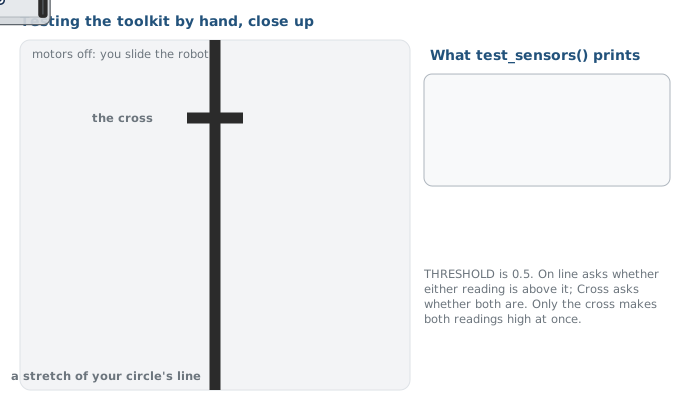
Step 1 · is_at_cross()
Write the body. Add " Cross:", is_at_cross() to the print in test_sensors(), set
the run line to test_sensors(), and slide the robot along the circle: False all
the way around, then True only when both sensors sit on the crossing strip. If it's
True on the plain circle, the threshold is too low; if it never goes True on the
cross, too high.
Step 2 · The whole toolkit
test_sensors() should now print all five: left, right, error, on-line, cross. Check
four positions and write down what you see — centered on the line (False, True),
off to one side (error positive or negative; False, True), completely off the line
(False, False), and on the cross (True, True).
Step 3 · set_threshold()
Add set_threshold() to the section without global, call set_threshold(0.9) as
the first line of test_sensors(), and slide over the cross: is_at_cross() still
fires, because the real THRESHOLD never changed. Add the global line and run again
— now nothing reads as tape. Take the call out again when you're done; the function
can stay.
Step 4 · Nothing broke
Set the run line to test_follow() and run it once. The toolkit changed under it
this lesson, and the follower should not care. From here on this section is finished:
the next lessons use it and don't touch it.
Real-world connections
Toolkits of small functions sharing a little state are how driver code is written:
Device drivers
A sensor library is a handful of functions around one shared device handle — exactly this shape.
Everything you import
XRPLib's own reflectance module is functions and settings bundled the same way.
One place to fix
When the hardware changes, one function changes. Everyone who called it is unaffected.
Wrap-up
- Where do
reflectanceandTHRESHOLDlive, and why can every function see them? (At the top of the file, outside any function — they're globals.) - Why does
get_error()callget_left()rather than the hardware? (One place knows how to read the sensor.) - When do you need
global? (Only to assign to a global inside a function.)