Lesson 2-8 · Detecting Intersections
Lesson 2-8 · Detecting Intersections
Teacher mode is on. Toggle it off (bottom-right) to preview the student view.
Last lesson you finished the sensor toolkit and tested all five functions by sliding
the robot over the tape by hand. Now the robot drives on the whole of it. Your
follower in test_follow() runs forever; this lesson gives it a reason to stop — the cross — and the stopping is done by a
function you already trust. First is_at_cross() gets one more test, this time with
the robot moving. Then it goes in charge of the follower's loop.
Learning Objectives
By the end of this lesson you will be able to:
- Test
is_at_cross()on a moving robot, with no line following in the program - Write
track_to_intersection(): follow the line untilis_at_cross()says stop, then drive the robot's center onto the cross - Explain why the robot drives 8.75 cm after the sensors reach the cross
- Explain why the cross is detected in the loop condition, not inside the loop body
- Program a response to the cross (stop, turn around, follow back)
This lesson's skeleton
Paste this into robot.py above RUN — it lands at the end of the LINE TRACKING
section, which is where it belongs. The first real driving function goes in next to
the test that has been doing the job so far.
# --- Lesson 2-8: follow to a cross ---
# track_to_intersection() is the follower from test_follow()
# with a reason to stop: it follows until is_at_cross() says
# the sensors are on a crossing line, then drives on until
# the robot's center is on it. Lesson 2-9 adds the turns.

def track_to_intersection():
    # until is_at_cross():
    #     correction = get_error() * KP
    #     steer with arcade(BASE_EFFORT, correction)
    # then stop the motors
    # then drive straight 8.75 cm: the robot's center onto
    # the cross
    pass

def test_cross_moving():
    # robot 20-30 cm from a straight line, square on: drive
    # until the cross check fires
    while not is_at_cross():
        drivetrain.set_effort(0.3, 0.3)
    drivetrain.stop()
    print("Cross!")

def test_track():
    # robot on the circle, pointed along it: follow to the
    # cross and stop
    track_to_intersection()
    print("Done!")

def test_reverse():
    # follow to the cross, turn around on it, follow back
    track_to_intersection()
    drivetrain.turn(180)
    track_to_intersection()
    print("Done!")
The loop's body is the body of test_follow(). What's new is the while line and the
drive after the loop.
One more test, moving this time
Sliding the robot by hand showed that is_at_cross() reads the tape correctly. It
didn't show whether a driving robot gets a clean reading at the moment both sensors
arrive on the strip. test_cross_moving() checks that by itself, before any line
following is in the program: it's Lesson 2-2's drive-to-the-edge program with the
condition swapped for a function call. If the robot stops with both sensors on the
tape, is_at_cross() works at driving speed, and anything that goes wrong later is
not its fault. If it drives straight through, the sensors crossed the tape faster than
the loop read them — drop the effort to 0.2 — or the threshold is too high. If it
stops before the tape, something lighter than the floor counted as black.
Why test is_at_cross() with a straight drive before using it in the line follower?
Follow until the cross
Now the follower. test_follow() is while True: — it follows forever. Change the
condition, and the looking is done by the loop condition while the following is
done inside the loop. The body is the two lines you already have, and the outline in
the skeleton says so.
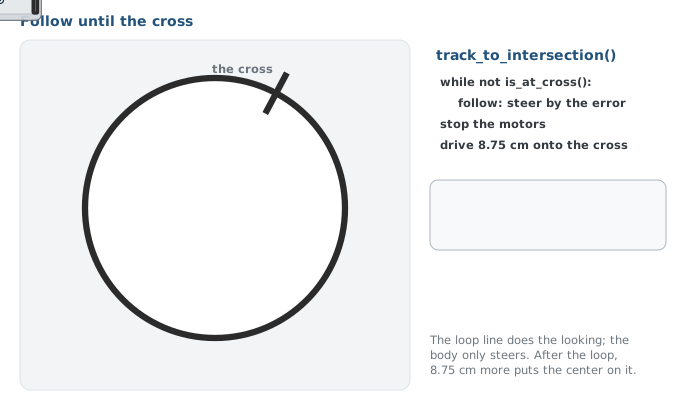
Read the while line as a sentence: while not at a cross, follow. Nothing inside
the loop checks for the cross — that's the condition's job. Nothing in the condition
steers — that's the body's job. When both sensors reach the cross, is_at_cross()
returns True, the loop ends, and the robot stops.
What makes track_to_intersection() stop?
In track_to_intersection(), where is the intersection detected?
Arriving: the center on the cross
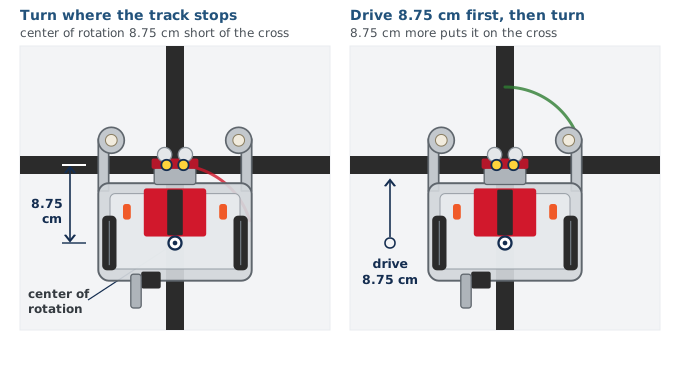
When the loop ends, the sensors are on the cross. But they sit at the very front of
the robot, and the robot turns about its center of rotation, the hole between the
drive wheels where a pen goes, 8.75 cm further back. So track_to_intersection() ends
with one more move: drive straight 8.75 cm. Now the robot's center is on the cross.
That does two jobs:
- Turns spin on the cross. Turn from where the sensors stopped and the robot swings about a point short of the cross. Turn from the center and the sensors come down on the new line.
- The next track starts clean. The sensors end up past the tape, so the next
track_to_intersection()has a line to follow instead of stopping at once.
It's a distance, not a time.sleep(), on purpose. Eight and three-quarter centimeters
is the same with a full battery or a flat one; half a second is not. You know the
drivetrain call that drives a distance: you've used it since Lesson 1-8.
Why does track_to_intersection() end by driving 8.75 cm rather than driving for half a second?
Activity · Drive on the toolkit
The skeleton is pasted in at the end of the LINE TRACKING section; the run block still waits for the button before every test.
Step 1 · is_at_cross(), moving
Set the run call to test_cross_moving(). Robot 20 to 30 cm from a straight line,
square on. It should stop with both sensors on the tape. Try it from three distances.
Don't go on until it does.
Step 2 · track_to_intersection()
Write the body — start by copying the loop out of test_follow() — and set the run
call to test_track(). Put the robot on the circle, pointed along it. It should follow the line around and stop with its center on the cross: put a finger on the tape beside the robot, and the pen hole between the wheels should sit over it. If it
weaves, this is the same gain you tuned in Lesson 2-6; if it stops somewhere that
isn't the cross, step 1 already told you the cross check is fine, so look at where the
follower put the sensors.
Step 3 · Follow, reverse, follow
Set the run call to test_reverse(). The robot follows to the cross, turns around on
it, and follows the circle back the other way to the same cross.
Step 4 · Challenge — count the crossings
Write test_count(): the robot reverses at the cross four times and stops,
printing the count at each cross — "Cross # 1", "Cross # 2", and so on, then "Done!".
You know a loop that runs a fixed number of times. This is a direct preview of the
Module 2 final project.
Real-world connections
Watching a continuous stream for a specific event is everywhere in automation:
Rail junctions
Trains detect track sensors at switches to decide which way to route.
Conveyor triggers
A sensor spots each item passing a point and triggers a sort, stamp, or count.
Step & tap detection
Your watch watches a constant sensor stream for the pattern that means "a step" or "a tap."
Wrap-up
- Why test
is_at_cross()with a straight drive first? (So a failure can only be the cross check.) - Where does
track_to_intersection()look for the cross? (In thewhilecondition; the body only steers.) - What ends
track_to_intersection()'s loop? (Both sensors on the cross — not a timer, not a count.) - Why drive 8.75 cm after the loop? (The sensors reach the cross first; the robot's center, which it turns about, is 8.75 cm behind them.)