Lesson 2-9 · Line-Tracking Functions
Lesson 2-9 · Line-Tracking Functions
Teacher mode is on. Toggle it off (bottom-right) to preview the student view.
Last lesson the robot followed the line to a cross and stopped with its center on it.
This lesson finishes the driving toolkit: two turns that spin on the cross until a
sensor finds the next line, built on the five sensor functions from Lesson 2-7 and
written one at a time, each tested before the next. With track_to_intersection()
from Lesson 2-8, that's three driving functions — and they
drive every robot program for the rest of the course, so the names you learn today are
the ones you'll be using in Module 5.
Learning Objectives
By the end of this lesson you will be able to:
- Say what ends each of the three driving functions, and why none of them is a timer
- Write
turn_clockwise()andturn_counterclockwise()as sensor-ended turns: a blind start, then spin untilis_either_on_line() - Drive a follow, turn, follow course with three function calls, from a test function in your one file
This lesson's skeleton
Paste this into robot.py above RUN, at the end of the LINE TRACKING section. It
finishes that section: one setting, two function outlines, and the tests for them.
# --- Lesson 2-9: turn to the next line ---
# Completes the driving toolkit begun in Lesson 2-5.
# track_to_intersection() stops with the robot's center on
# the cross. The two turns spin there until a LINE SENSOR
# function sees the next line, so no turn depends on a
# timer. With these three, every program from here to
# Module 5 is a list of calls to this section.
TURN_EFFORT = 0.25       # spin speed during a turn

def turn_clockwise():
    # 1. blind turn, about 60 deg: get BOTH sensors off this line
    # 2. keep spinning in place (no forward speed, only turn)
    # 3. wait until a sensor sees a line
    # 4. stop
    pass

def turn_counterclockwise():
    # the mirror image: same four moves, opposite direction
    pass

def test_turn():
    # follow to the cross, then turn until a sensor finds a
    # line: on the circle, that is all the way around
    track_to_intersection()
    turn_clockwise()

def test_course():
    # follow, turn around, follow the circle back to the
    # cross: the whole lesson in three calls
    track_to_intersection()
    turn_clockwise()
    track_to_intersection()
    print("Done!")
One more change, in the LINE TRACKING settings: raise BASE_EFFORT to 0.4. Now that the
steering is tuned the robot can go a little faster; if yours weaves at 0.4, drop it
back.
Three functions, and what ends each one
The driving toolkit is three functions. You have one; you're going to write two more. For each, this page tells you what it does, what makes it stop, and the skeleton's outline says how — the design is the lesson; the typing is yours.
The one you have: following the line
track_to_intersection() is the control loop with is_at_cross() as the exit
condition — until you're at a cross, steer toward the line; then stop. All the sensor
arithmetic is behind get_error() and is_at_cross(), and nothing in the function
reads the hardware directly. Its loop ends on a cross, and a measured 8.75 cm puts
the robot's center on it. Keep that pattern in mind: the two turns also end on
something the robot can sense.
Turning until a sensor says stop
How far should a turn go? On the grid in Module 3 it will be a quarter turn, onto the
cross street. On your circle the cross is too short for the sensors to touch while the
robot spins, so the next line they meet is the circle behind: the same turn goes all
the way around and stops facing back the way it came. You could time either one, and
it would be right until the battery dropped. Instead, turn until the sensors find the
next line, wherever it is. That's the four moves in the
skeleton's outline of turn_clockwise(), and turn_counterclockwise() is its mirror
image.
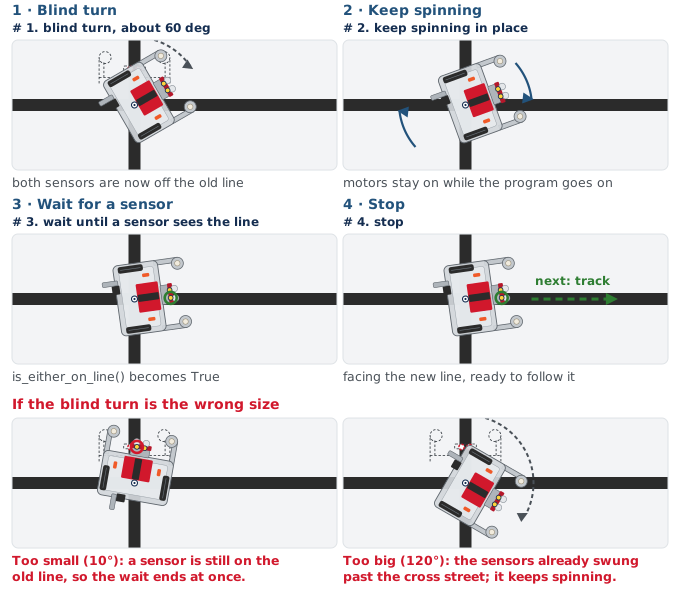
The blind turn is there because the robot starts the turn with its sensors on the
line it was following: without it, is_either_on_line() is already True and the wait
ends before the robot has moved. Step 2 is arcade() with no forward speed, only a turn
value.
That waiting loop has nothing to do on each pass — the motors are already running
from the line above; the loop's only job is to keep checking the sensor. Python needs
something in a loop body, so you write pass: the same word as in the outlines, with
the same meaning, nothing to do here.
Why 60° and not 90°? Because the sensor finishes the turn, the blind part only has to clear the old line — not so little that a sensor is still on it, not so much that the sensors swing past the new one (the bottom row of the figure). The two functions are mirror images: swap the sign on both the blind turn and the spin, and the direction swaps.
Why does turn_clockwise() start with a blind 60-degree turn before the while loop?
What does pass do inside the while loop?
Activity · Build the toolkit, one function at a time
The skeleton is pasted in and BASE_EFFORT is 0.4. For every step the robot starts
on the circle-with-cross, pointed along the circle, and the run block waits for the
button.
Step 1 · track_to_intersection(), at the new speed
Nothing to write — but the speed went up, so set the run call to test_track() and
run it once more. It should follow the line and stop with its center on the cross.
If it weaves at the new speed, drop BASE_EFFORT back to 0.3. Don't go on until the
function you're building on works.
Step 2 · turn_clockwise()
Write the four moves, with TURN_EFFORT at 0.25 to start, and run test_turn().
Watch the two halves — the blind part should carry both sensors clear of the circle,
and then the spin should carry on until a sensor meets the circle again, with the
robot facing back the way it came. Two things to fix if it doesn't:
- The turn stops at once, barely moving. The blind part was too small — a sensor was still on the old line when the loop started. Increase the 60°.
- The turn stops a quarter of the way round, facing along the cross. The cross is too long: the sensors found it during the spin. Trim it to about 10 cm.
Step 3 · turn_counterclockwise()
Mirror step 2: same four moves, both signs flipped. Change test_turn() to call it
instead, run it from the cross, and confirm it also turns all the way around, this
time the other way.
Step 4 · Three lines to drive a course
With all three working, run test_course(). Look at it: the part of the program that
actually drives is three calls. All the sensor reading and motor control lives in the
sections above it, so the test reads as a list of intentions. Compare it to the wall of
code this was back in Lesson 2-6.
Challenge: add turn_around() to the section, and a test_turn_around() for it.
On your circle its body is one call: turn_clockwise() already ends facing back the
way it came. Why write a function for one call? Because the name says what you mean,
and because on a grid, where the cross street stops a turn a quarter of the way round,
turning around takes two calls: turn_around() is the one place that would change.
Real-world connections
Layered toolkits are how robot software is organized:
Skill stacks
Perception functions feed motion functions feed planning functions — each layer built on the one below, as the driving toolkit is built on the sensor toolkit.
Sensor-ended actions
Parking assist stops when the sensors say the space is reached, not after a set number of seconds.
Libraries on libraries
Almost every library you will use is built on another one, calling its functions rather than re-reading the hardware.
Wrap-up
- What ends each of the three driving functions? (A cross and then a distance, a line, a line.)
- Why the blind 60° at the start of a turn? (To get the sensors off the old line so the loop can end on the new one.)