Lesson 2-10 · Final Project
Lesson 2-10 · Final Project
Teacher mode is on. Toggle it off (bottom-right) to preview the student view.
Time to put it all together. robot.py has two finished sections — LINE SENSOR, which
reads the tape, and LINE TRACKING, which drives on it — and this project is the first
program built entirely out of them: follow the taped circle, detect the cross, reverse
direction, and repeat four times, then stop. It's the capstone of everything in Module
2: sensors, control loops, decisions, and functions built on functions.
Learning Objectives
By the end of this project you will be able to:
- Combine both sections of
robot.pyinto one complete, working program - Write a short, readable project function that is mostly calls to your own functions
- Test and debug a real robot behavior systematically
- Explain and demonstrate your design
The mission
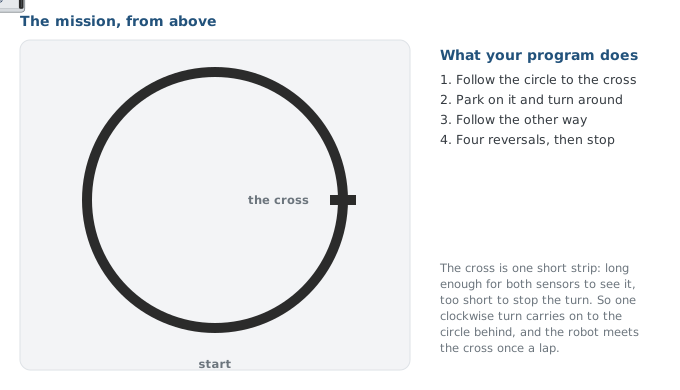
Your robot must:
- Follow the taped circle with
track_to_intersection(). - Detect the cross intersection.
- Reverse direction.
- Keep following, and repeat for 4 total reversals.
- Stop and print a completion message.
If you built the LineSensor and LineTrack classes, build this project on them:
tracker.track_to_intersection() wherever the list above says track_to_intersection().
The functions version is for everyone else.
Standard
The mission above, using your two sections unchanged. Focus on a clean project function and solid debugging.
Enhanced
Use a turn_around() function (the Lesson 2-9 challenge, if you did it; write it now if not), count each leg, and flash the LED or beep at every reversal.
Advanced
Add line-loss recovery, or speed up on later laps. Invent your own twist (teacher-approved).
This lesson's skeleton
Paste this into robot.py above RUN, at the end of the LINE TRACKING section. There
are no new driving functions — the project is two test functions, and the second one
is the project.
# --- Lesson 2-10: final project ---
# The module project: lap the circle, reversing at the cross,
# four times, then stop. Nothing new is defined for it. It is
# a list of calls to the three driving functions above, which
# is the point: the sections did the work, the project
# assembles them.

def test_reversal():
    # follow to the cross, turn around (one clockwise turn
    # does it here), then follow back to the cross
    pass

def test_final_project():
    # the mission: follow to the cross, reverse,
    # four times in all; then stop and print "Done!"
    # write your plan here as comments first, then the code
    pass
Both bodies are yours. The outline is deliberately short, because the plan is the first part of the project — that's the next activity.
Activity · Plan before you build
Pseudocode test_final_project() first, in plain English, before you type any
Python. Write your plan as # comments inside the function, one step per line. It
will be shorter than you expect, because the two sections do the heavy lifting — each
line of your plan is close to one line of code, and when you're done, each comment
will have its line of code under it.
For the final project, do you need to rewrite the sensor and driving logic from scratch?
Build it in pieces
You have every part already: the LINE SENSOR section finished in Lesson 2-7, the LINE TRACKING section finished in Lesson 2-9, and the reversal trick you worked out above. What's left is assembling them and tuning — which is most of what real robot work is.
Build in this order, and don't go on until each step works:
- Stop on the cross. Set the run line to
test_track()from Lesson 2-8 and run it once more. Does the robot stop with its center on the cross? - One turn. Set the run line to
test_turn(). Does the turn find the line again? - One full reversal. Write the body of
test_reversal()and run it: track, one clockwise turn, follow back the other way to the same cross. (If you did the Lesson 2-9 challenge,test_turn_around()is this test already.) - The loop. Write
test_final_project()under your plan comments and set the run line to it.
Activity · Test, tune, present
Work up in stages, and keep a note of what you tuned:
- Does
test_track()follow and stop with the robot's center on the cross? - Does one turn in
test_turn()find the line again? - Does
test_reversal()work end to end? - Do all four reversals in
test_final_project()run and stop?
Then demo it and reflect: what was hardest, how did building the file one tested function at a time make the project easier, and what would you add with more time?
Your robot follows the line but blows past the cross without stopping. What's the best first thing to try?
You built a robot that thinks 🎉
Look back at the journey: you started Module 2 reading a single sensor value, and
you're finishing it with two cooperating sections of one file that follow a line,
detect intersections, and navigate a course. That design — sensing and driving cleanly
separated, each built on the layer below, each function tested the lesson it was
written — is exactly how professional robot code is structured, and the next module
adds a section on top of it. (If you did the class extensions, you have the same
thing as LineSensor and LineTrack objects — and that is the version you should
have used for this project.)