Lesson 4-1 · The Main Program
Lesson 4-1 · The Main Program
Teacher mode is on. Toggle it off (bottom-right) to preview the student view.
Today you write the top of the tree from Lesson 4-0: the main program that sends the robot to every destination on a list. The planner and the driver don't exist yet, so they start as stubs. The program runs today, and the robot never moves.
Learning Objectives
By the end of this lesson you will be able to:
- Write a position as a tuple,
(x, y), and several destinations as a list - Run the same code for every item in a list with a
forloop - Use stubs so a program runs before the functions it calls are written
- Return two values from a function, and unpack them where it is called
A position is one value
In Lesson 4-0 every intersection was a pair of numbers, (x, y): x counts across to the
right, y counts up, away from you, both from (0, 0), the corner nearest you.
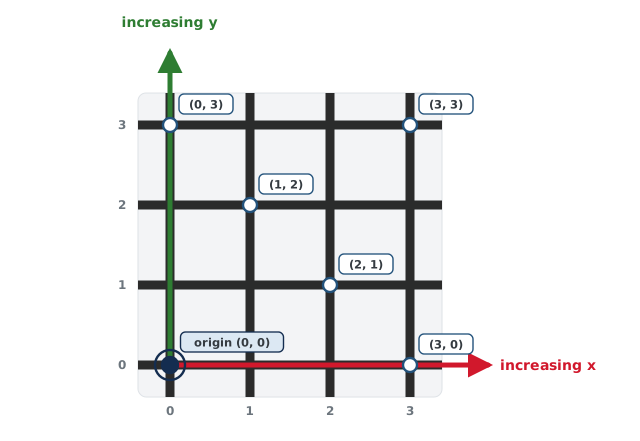
Python can store that pair as one value, written just as on the map. It's called a tuple:
robot_position = (0, 0)
delivery_destination = (2, 3)
Parentheses, a comma, x first. Order matters: (2, 3) and (3, 2) are different
intersections.
The robot is 3 across and 1 up from the corner nearest you. Which line stores that?
Destinations are a list
The delivery robot has five destinations. Five variables would need five copies of the code. A list holds them all, in order, in one variable: square brackets, commas between the items.
DELIVERY_STOPS = [(2, 3), (1, 0), (3, 1), (2, 2), (0, 0)]
Each item is a tuple, so this is a list of positions. To do something with every item, loop over the list:
for delivery_destination in DELIVERY_STOPS:
    print("Go to", delivery_destination)
Each time around, the next item of the list is assigned to delivery_destination, first
to last.
It's the for loop from Lesson 1-10, with a list in place of range().
How many lines does this print, and what is the last one?
STOPS = [(1, 1), (0, 2), (3, 3)]
for stop in STOPS:
print("Go to", stop)The main program in words
The robot starts at (0, 0) facing North. For each destination on its list:
- Plan the path from where it is now.
- Drive the path, which leaves it somewhere new, facing a new way.
Then it plans the next leg from there. So the program keeps track of two things: the
robot's position, a tuple, in robot_position, and its heading, a number from 0
to 3, in robot_heading. Today all you
need is that 0 means North; the rest comes in Lesson 4-4. Together they are the robot's
pose.
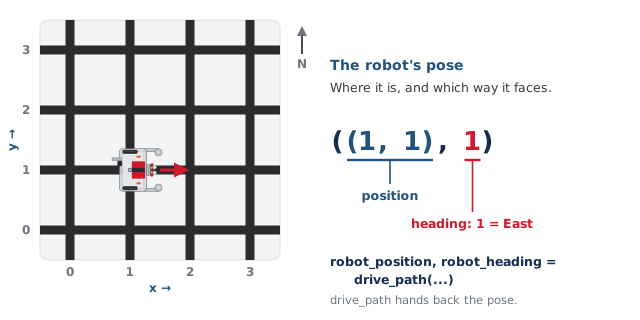
The planner will be compute_manhattan_path(start, destination), and the driver
drive_path(path, current_position, current_heading).
Stubs: run it before the parts exist
A stub is a stand-in function: same name, same parameters, same kind of return value, but only enough inside to let the program run. Each stub prints what the real function will print: the planner says what it is planning, and the driver says each move. So the printout shows that the main program called them, and with what.
def compute_manhattan_path(start, destination):
    """STUB: a pretend path that jumps straight to the
    destination. Lesson 4-2 replaces it."""
    print("computing path from:", start, "to:", destination)
    return [destination]

def drive_path(path, current_position, current_heading):
    """STUB: pretend to drive -- just jump to each
    intersection in path. Lesson 4-4 replaces it."""
    for next_pos in path:
        print("moving: from", current_position, "to:", next_pos)
        current_position = next_pos
    return current_position, current_heading
The planner stub's path is wrong (a robot can't jump three blocks), but [destination]
is a list with one position in it, and a list of positions is all the main program needs
today.
Handing back two values
drive_path() ends with return current_position, current_heading. A comma between two
values makes a tuple, so it hands back both at once: the pose. Where it is called, give
each value its own variable:
robot_position, robot_heading = drive_path(
    path, robot_position, robot_heading)
That's unpacking: the first variable on the left gets the first value, the second
gets the second. There must be one variable for each value, or Python stops with a
ValueError.
Why it has to hand them back. When the call runs, current_position starts with the
value of robot_position. Inside the function, current_position = next_pos changes only
drive_path()'s own variable. As with assigning inside a function in Lesson 2-7, the
caller's robot_position is never touched. So the only way the main program learns where the
robot ended up is the return value.
This lesson's skeleton
Paste this into robot.py above RUN, after the Module 3 code. It has the two stub
functions, compute_manhattan_path() and drive_path(), each under a comment banner,
and the main program at the end.
# ===== MANHATTAN PLANNER =====
# Plans a route across the grid: given where the robot is and
# where it should go, returns the list of (x, y) tuples to
# drive to. Nothing in here touches a sensor or a motor.

def compute_manhattan_path(start, destination):
    """STUB: a pretend path that jumps straight to the
    destination. Lesson 4-2 replaces it."""
    print("computing path from:", start, "to:", destination)
    return [destination]

# ===== NAVIGATOR =====
# Drives a planned path, one intersection at a time, and hands
# back where the robot ended up and which way it faces.

def drive_path(path, current_position, current_heading):
    """STUB: pretend to drive -- just jump to each
    intersection in path. Lesson 4-4 replaces it."""
    for next_pos in path:
        print("moving: from", current_position, "to:", next_pos)
        current_position = next_pos
    return current_position, current_heading

# --- The main program: the delivery run ---
DELIVERY_STOPS = [(2, 3), (1, 0), (3, 1), (2, 2), (0, 0)]

def test_delivery():
    # 1. robot_position starts at (0, 0); robot_heading
    #    starts at 0, North
    # 2. for each delivery_destination in DELIVERY_STOPS:
    #      plan the path from robot_position, and print it
    #      drive it, and assign the pose it hands back
    #      print "new position:", robot_position,
    #            "heading:", robot_heading
    pass
Activity · Write it, run it
Step 1 · The loop on its own
Write step 1 and the for line of step 2. For now, put one line inside the loop:
print("next stop:", delivery_destination)
Set the run line to test_delivery(), run it, and press the button.
What correct looks like: five lines, one per stop, in list order.
Step 2 · Plan and drive
Replace that print with the rest of step 2. Run it. The robot stays on the desk.
What correct looks like: four lines per stop: what the planner was asked, the path,
the move, and where the robot is now. Each computing path from: starts at the
new position: of the leg before it. The heading is 0 every time: the driver stub never
turns.
Step 3 · Break it on purpose
Change the driving call to just drive_path(path, robot_position, robot_heading), with
nothing on the left. Before you run it, predict: what will each computing path from:
line say? Then run it.
Put robot_position, robot_heading = back and run it again.
A student calls drive_path(path, robot_position, robot_heading) on its own line, with nothing on the left, then plans the next leg. What goes wrong?
Wrap-up
- How does Python store a position, and several destinations? (A tuple,
(x, y); a list of tuples, in square brackets.) - What does
for delivery_destination in DELIVERY_STOPS:do? (Runs the loop body once per item, withdelivery_destinationset to each item in turn.) - What is a stub for, and why does it print? (It lets the program run before the real function is written; the print shows it was called, and with what.)
- How many lines does the program print per stop, and what are they? (Four: the plan request, the path, the move, the new position.)
- Why must the main program write
robot_position, robot_heading = drive_path(...)? (Assigning to a parameter changes only the function's own variable; the return value is the only way the new pose gets back.)