Lesson 4-2 · The Planner: A Path That Grows
Lesson 4-2 · The Planner: A Path That Grows
Teacher mode is on. Toggle it off (bottom-right) to preview the student view.
The planner stub hands back [destination]: one jump. A real path lists every
intersection on the way. Today the stub starts to go: by the end, the planner builds
real paths for any trip that goes right and up. Left and down are Lesson 4-3.
Learning Objectives
By the end of this lesson you will be able to:
- Trace a path by hand: across first, then up
- Start with an empty list and add to it with
append() - Unpack a tuple into
xandy, and make a new tuple from them - Build a path inside a
whileloop, one step per trip around
One step at a time
Each step moves the robot to a neighboring intersection, so exactly one of x or y changes, by 1. Never both: that would be a diagonal, and the robot can't drive one.
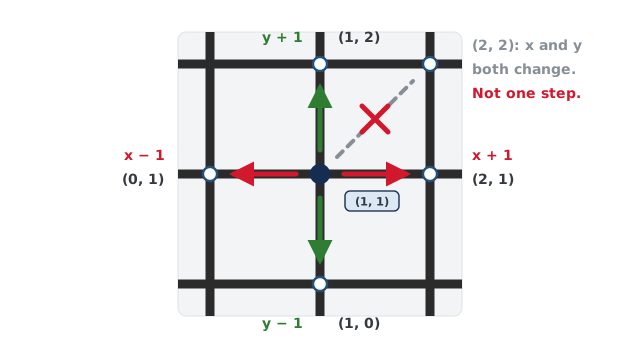
The Manhattan rule from Lesson 4-0: step across until x is right, then step up or down until y is right.
Activity · Trace it on paper
Trace Leg 1 of the delivery run, (0, 0) to (2, 3), one row per move. Row 1 is done for you. Then write the whole path as a Python list.
| Step | Action | New position |
|---|---|---|
| 1 | x + 1 | (1, 0) |
| 2 | ||
| 3 | ||
| 4 | ||
| 5 |
Notice what's not in the path: the start, (0, 0). A path lists the places the robot drives to, and it's already standing on the start.
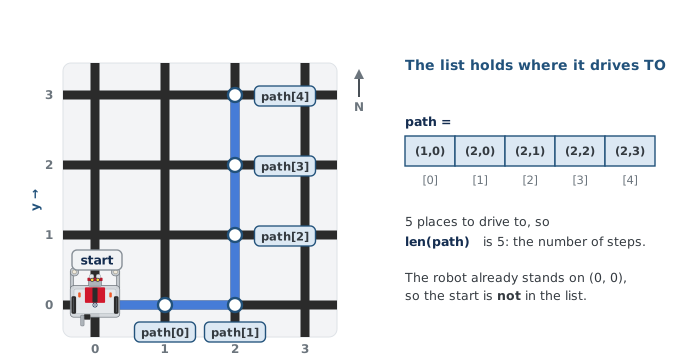
A list can grow
In Lesson 4-1 you wrote a list out in full. A planner can't: it doesn't know the path
until it works it out. So it starts with an empty list and adds one position at a
time with append(), which puts an item on the end:
path = []
path.append((1, 0))
path.append((2, 0))
print(path)          # [(1, 0), (2, 0)]
print(len(path))     # 2
len() counts the items. Mind the double parentheses in path.append((1, 0)): the outer
pair belongs to append(), the inner pair is the tuple.
What does this print?
stops = []
stops.append((0, 1))
stops.append((0, 2))
stops.append((1, 2))
print(len(stops), stops)
Activity · Build the planner
Step 1 · Leg 1, by hand
In the compute_manhattan_path() function, keep the print line. Replace the
return [destination] line with these, in order:
- Assign an empty list to a variable named
path. - Append the five positions from your trace to
path, one line each, in trace order. The first ispath.append((1, 0)). - Return
path.
Run test_delivery().
What correct looks like: Leg 1's path matches your trace, and the driver stub prints one move for each step of it. Every other leg gets the same path, which is wrong for all of them.
Step 2 · Let a loop do the appending
Look at rows 1 and 2 of your trace: add 1 to x, write down the new position, and again,
until x is right. That's a while loop.
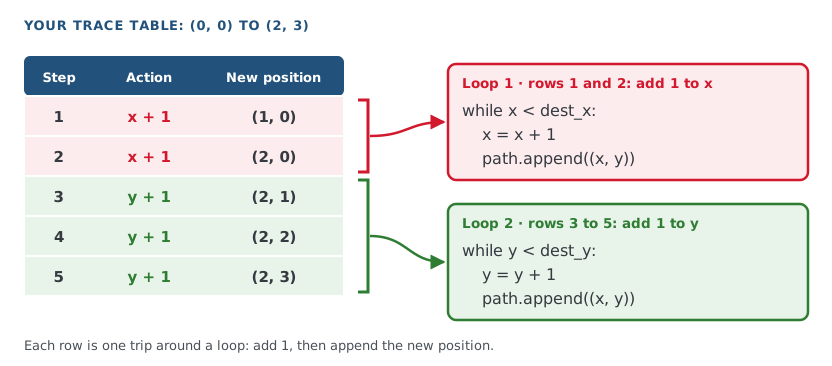
To add 1 to x, the function needs x on its own. Unpacking, from Lesson 4-1, takes a tuple apart:
x, y = start                     # start is (0, 0): x is 0, y is 0
dest_x, dest_y = destination     # (2, 3): dest_x is 2, dest_y is 3
x and y are where the plan has got to. They start as the start and change by 1 on
every move. After each move, (x, y) puts them back together as a new tuple for the
path.
The planner never looks at the robot: the caller hands it start. That's how one function
plans every leg from wherever the last one ended, and how a test can give it any start.
Replace the whole compute_manhattan_path() function with this. The east loop is written for you; north is yours
in Step 3. Add test_planner() under it.
def compute_manhattan_path(start, destination):
    """Return the (x, y) steps from start to destination, across
    first, then up or down. The start itself is not in the list."""
    print("computing path from:", start, "to:", destination)
    path = []
    x, y = start              # where the plan is now
    dest_x, dest_y = destination   # where it is going

    # East: keep stepping right until x matches dest_x
    while x < dest_x:
        x = x + 1             # one step right
        path.append((x, y))   # record the new spot

    # North: copy east, but step y until it matches dest_y

    return path

def test_planner():
    print(compute_manhattan_path((0, 0), (2, 3)))
    print(compute_manhattan_path((0, 2), (3, 2)))
    print(compute_manhattan_path((2, 0), (2, 3)))
Before you run it, trace the three trips in test_planner() on paper. That's a paper
test: you work out the right answer by hand first, so you can tell whether the program's
answer is right. Then set the run line to test_planner() and run it.
What correct looks like: each trip prints what was asked, then the path. Only the east loop exists, so:
computing path from: (0, 0) to: (2, 3)
[(1, 0), (2, 0)]
computing path from: (0, 2) to: (3, 2)
[(1, 2), (2, 2), (3, 2)]
computing path from: (2, 0) to: (2, 3)
[]
The first trip goes right two and stops. The second needs no move up, so it's already complete. The third only goes up, so nothing is appended.
Step 3 · Break it on purpose
Move path.append((x, y)) one indent to the left, so it lines up with while. Predict
the first line of output, then run it.
Put the indent back.
A loop is meant to build a path, but the list ends up holding only the last position. What's wrong?
Step 4 · Write north
Under the north comment, copy the east loop, comparing y with dest_y and stepping y
instead of x. Leave path.append((x, y)) as it is: it always records the whole
position. Run test_planner().
What correct looks like: all three paths match your paper traces.
Step 5 · Run the main program
Set the run line back to test_delivery() and run it.
What correct looks like: Leg 1 is right, and the driver stub now moves one step at a time. Leg 2 is not: its path is empty, so the robot never leaves (2, 3), and every leg after it goes wrong.
Why is the path for Leg 2, (2, 3) to (1, 0), empty?
Why a new tuple every step
Could the loop just change the x inside one tuple? Try it in the shell:
spot = (2, 3)
spot[0] = 5      # TypeError: 'tuple' object does not support item assignment
A tuple can't be changed once it's made. That's right for a position: (2, 3) should
always mean the same intersection, however many lists it's in. A list is the opposite: it
can grow. So a position is a tuple, and a path is a list of tuples.
Which is true?
Wrap-up
- How does the planner build a path? (Start with
[], andappend()one position on every trip around a loop.) - What does
x, y = startdo? (Unpacks the tuple: x gets the first number, y the second.) - Why isn't the start in the path? (The robot is already there; the path lists where it drives to.)
- What still doesn't work? (Trips that go left or down: both loops are skipped.)