Lesson 4-6 · On the Robot
Lesson 4-6 · On the Robot
Teacher mode is on. Toggle it off (bottom-right) to preview the student view.
Your program already runs the whole delivery, on screen. Today the last two stubs come out, the real Module 2 functions go in, and the robot drives it. The algorithm is already tested, so if the robot does something the printout didn't, the problem is on the robot's side.
Learning Objectives
By the end of this lesson you will be able to:
- Name the Module 2 functions the driving code is built on, and what each does
- Swap the two stubs for the real functions and drive the delivery run on the grid
- Tell an algorithm bug from a robot problem by comparing the robot with the printout
- Demonstrate a working multi-destination run on the XRP
The toolkit you already have
Module 2 ended with these in the LINE TRACKING section of robot.py, and Module 3 drove
the whole grid with them:
| Function | What it does | Ends when |
|---|---|---|
track_to_intersection() | Follows the line forward | the robot's center is on the cross |
turn_clockwise() | Pivots right | the sensors find the next line |
turn_counterclockwise() | Pivots left | the sensors find the next line |
None of them knows anything about coordinates, headings or paths: they only follow tape. That's the split from Lesson 4-0 again. The planner doesn't know how to drive, the Module 2 functions don't know what a path is, and the NAVIGATOR sits between them.
Activity · Swap the stubs, drive the run
Step 1 · Swap two lines
- In
turn_to(), changefake_turn_clockwise()toturn_clockwise(). - In
drive_path(), changefake_track_to_intersection()totrack_to_intersection().
That's all. Leave the two fake functions in the file: nothing calls them now, but they're handy for checking a new run on screen first.
If you built the LineTrack class in Lesson 2-9, the real calls are
tracker.turn_clockwise() and tracker.track_to_intersection().
Step 2 · Drive it
Put the robot on (0, 0) facing North. Run test_delivery() and press the button.
What correct looks like: the robot does exactly what last lesson's printout said, in
the same order. Count the turns at each corner against the printout: one right turn at the
start, three at (2, 0). The robot finishes back on (0, 0), facing South, parked on the
cross. The moving: lines still print as it goes.
Yesterday's printout was right, but today the robot turns one too few times at a corner. Where is the problem?
Challenge · The short way round (optional)
At (2, 0) the robot turned right three times to face what was a quarter turn to its left.
Make turn_to() turn whichever way takes fewer turns.
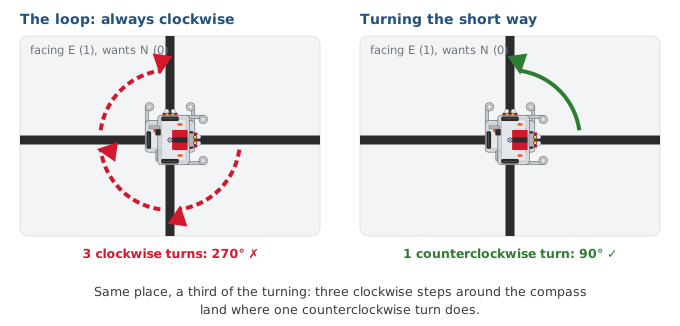
Work out first, on paper, when counterclockwise is actually shorter: try the four
headings starting from North. Then change turn_to() so it turns counterclockwise in
exactly those cases, keeps current_heading up to date either way, and still returns it.
Check it on screen first: add a fake_turn_counterclockwise() that prints
turn counterclockwise, use the fakes, and count the turns at each corner. Then swap the
real ones back in and drive. Nothing else in the file changes, because nothing else knows
how turn_to() does its job.
The rubric and extensions
| Category | Points | What it takes |
|---|---|---|
| Planner | 10 | compute_manhattan_path() correct for any start and destination; test_planner() passes |
| Driving functions | 15 | Correct get_desired_heading(), turn_to(), drive_path(); parked on the cross at every arrival; pose returned |
| Main program | 10 | test_delivery(): 4+ destinations, assigns robot_position, robot_heading from drive_path() |
| Screen run | 5 | The full run checked on screen with the stubs before the robot drove |
| Robot demo | 10 | Physically visits all destinations with the turns the printout predicted |
If you finish early, try an extension: a round trip (the destinations forward, then reversed); let the user type destinations; count the intersections driven and turns made across the whole run; or the class extension below.
Wrap-up
- What changed today? (Two lines: the fake turn and the fake track became the real Module 2 functions.)
- If the robot goes wrong but the printout was right, where do you look? (The robot side: turns, tape, battery.)
- Where did top-down pay off? (The whole run worked on screen before the robot moved, and every step was checked as it was added.)
One lesson is left. You picked up tuples and lists a piece at a time, as the program needed them. Lesson 4-7 puts the pieces side by side.