Lesson 4-7 · Tuples and Lists: What You Now Know
Lesson 4-7 · Tuples and Lists: What You Now Know
Teacher mode is on. Toggle it off (bottom-right) to preview the student view.
You never had a lesson on tuples or lists. You picked them up a piece at a time, because the delivery program needed them. This lesson lays the pieces side by side, checks that you can use them away from the robot, and adds one last idea that Module 5 depends on.
Learning Objectives
By the end of this lesson you will be able to:
- Say when to use a tuple and when to use a list
- Create, unpack, index, compare and loop over them without looking it up
- Predict what a few lines of tuple and list code print
- Explain what happens when two variables refer to the same list
Where you used each piece
Every line here is from your own robot.py.
| What it does | From your program | Lesson |
|---|---|---|
| Make a tuple | robot_position = (0, 0) | 4-1 |
| Make a list | DELIVERY_STOPS = [(2, 3), (1, 0), ...] | 4-1 |
| Loop over a list | for delivery_destination in DELIVERY_STOPS: | 4-1 |
| Unpack | robot_position, robot_heading = drive_path(...) and x, y = start | 4-1, 4-2, 4-4 |
| Start empty, then grow | path = [] and path.append((x, y)) | 4-2 |
| Compare | if actual == expected: | 4-3 |
| Pick one by index | HEADING_NAMES[robot_heading] | 4-4 |
Looping by index
for next_pos in path: hands you each item. When you also need its place in the list,
loop over the indexes instead:
for i in range(len(path)):
    print("step", i, "is", path[i])
len(path) is how many items there are, and range() counts from 0 up to one less: exactly
the indexes. Module 5 uses this to number the legs of a run.
A for line can also unpack. When every item is a tuple, name its parts and each pass
splits the item into them:
for x, y in path:
    print("x is", x, "and y is", y)
This is the same as for next_pos in path: followed by x, y = next_pos. Module 5 uses it.
Tuple or list?
| Tuple | List | |
|---|---|---|
| Written with | ( ) | [ ] |
| Can it change? | No | Yes: it can grow, and items can be replaced |
Index, unpack, ==, for, len() | Yes | Yes |
append() | No | Yes |
| In your program | a position, a pose | a path, the destinations, the heading letters |
The rule of thumb: a tuple is one thing made of a fixed number of parts, like a position. A list is any number of things in order, like the stops on a route.
A program must remember every intersection where the robot found an obstacle, adding to it as the robot drives. What should it use?
Activity · Predict, then run
Open a new file, not robot.py. For each numbered line, write down what you expect
it to print. Then type the program in, run it, and compare. One line stops the program
with an error: say which, and why.
path = [(1, 0), (2, 0), (2, 1)]
print(len(path))                               # 1
print(path[0])                                 # 2
print(path[2][1])                              # 3
x, y = path[1]
print(x + y)                                   # 4
path.append((2, 2))
print(len(path), path[3])                      # 5
print(path == [(1, 0), (2, 0), (2, 1)])        # 6
path[0] = (0, 1)
print(path)                                    # 7
path[0][0] = 5                                 # 8
After these lines, what is total?
legs = [(2, 3), (1, 0)]
total = 0
for leg in legs:
    x, y = leg
total = total + x + yGiven path = [(1, 0), (2, 0), (3, 0)], which line gives the y of the last position?
What the variable actually holds
One idea is still missing, and it explains something you have already seen.
In Lesson 1-9, a variable was a named location in memory, and = stored a value
there. For a number, that's the whole story.
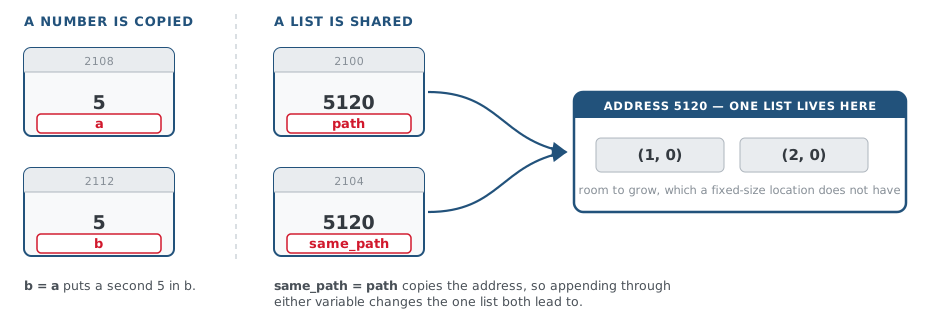
A list grows, but a memory location is a fixed size. So the list lives somewhere else in memory, and the variable holds its address. An address stored in a variable is called a reference. It matters when two variables hold the same address:
a = 5
b = a                     # copies the VALUE: two 5s

path = [(1, 0)]
same_path = path          # copies the ADDRESS: still one list
same_path.append((2, 0))
print(path)               # [(1, 0), (2, 0)]  <- path changed too
What does scores hold after these three lines?
scores = [10, 20]
backup = scores
backup.append(30)
Assigning versus changing
In Lesson 4-1, current_position = next_pos inside drive_path() did not change the
main program's robot_position. That still holds, for lists too. The difference is between two
things a function can do with a parameter:
def move(spot):
    spot = (9, 9)             # ASSIGNS: spot now holds something else

def extend(steps):
    steps.append((9, 9))      # CHANGES the list steps refers to

here = (1, 1)
move(here)
print(here)                   # (1, 1)  -- untouched

route = [(1, 1)]
extend(route)
print(route)                  # [(1, 1), (9, 9)]  -- changed
= stores a new value in the function's own variable, and the caller never sees it.
append() goes to the list itself, and there is only one list. A tuple can't be changed
at all, so a function can never alter a position you hand it.
This isn't a trap; the course relies on it. In Module 5 a planner sees each obstacle you add to your list because it holds the list's address, not a copy.
A function is handed a list called blocked and runs blocked.append((2, 2)). After it returns, what does the caller's list hold?
Real-world connections
GPS & maps
Latitude and longitude are two numbers naming one spot, passed around as a pair. A route is a list of them.
Feeds & playlists
A playlist or a feed is a list you add to and loop through, item by item.
Points & colors
Screen points (x, y) and colors (r, g, b) are stored exactly like coordinate tuples.
Wrap-up
- Tuple or list: which for a position, which for a path, and why? (Tuple: a fixed pair that shouldn't change. List: any number of steps, built up one at a time.)
- Name three things you can do with both. (Index, unpack, compare with
==, loop withfor, count withlen().) - What can a list do that a tuple can't? (Change:
append(), or replace an item.) - If two variables refer to the same list and you append through one, what does the other see? (The change: there is only one list, and both variables hold its address.)