Module Overview · When the Road Is Blocked
When the Road Is Blocked
Teacher mode is on — the gray boxes are yours only. Flip the switch (bottom-right) to preview the student view.
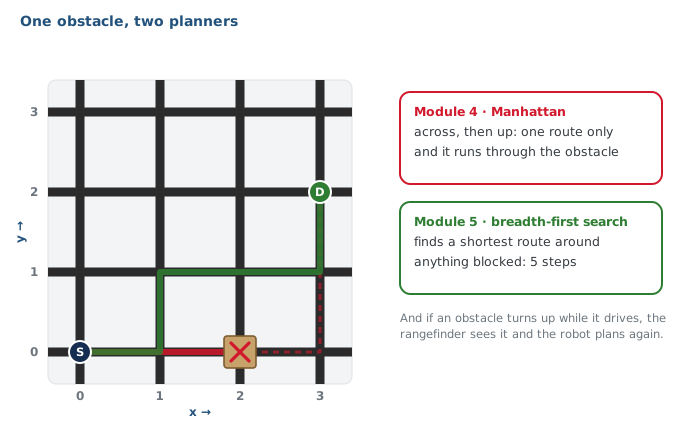
Module 4's robot plans its own routes, but always the same way, across and then up, and it assumes nothing is in the way. Put an obstacle on its route and it drives straight at it.
We'll use small boxes on intersections to represent obstacles.
By the end of this module your robot will visit several destinations on a grid with obstacles, plan around the ones it knows about, spot new ones with its rangefinder and re-plan, and do better on its second run. It's the last required module: everything you've built works together.
Learning Objectives
By the end of this overview you will be able to:
- Describe what the robot will do by the end of Module 5
- Explain why the Module 4 planner can't get around a blocked intersection
- Name the module's three new pieces (a map of the grid, a planner that searches it, obstacle detection) and what each does
- Explain what it means to swap one planner for another without changing the rest of the program
Three new pieces
The driving doesn't change: your Module 4 NAVIGATOR drives any list of intersections it's handed. What's new is which list it gets.
The grid as a graph
The grid written so a program can search it: every intersection, what it connects to, and what's blocked.
Breadth-first search
A planner that finds a shortest route around every blocked intersection on the map.
Obstacle detection
The rangefinder checks the next intersection before the robot drives there. If something is there, it goes on the map and the robot plans again.
If you write the BFS planner so that it returns its plan as a list of intersections, just like the Manhattan planner, the rest of your program stays the same.
The swap
Once the BFS planner passes its tests, you swap it in by changing one name, and the route that ran into the obstacle goes around it. That's the payoff of Lesson 4-0: you fixed what passes between planner and driver before writing either, so either side can be replaced without touching the other.
The Manhattan planner and the new planner both take a position and a destination and return a list of intersections. Why does that matter?
A robot that learns
Planning around known obstacles is half the job; the other half is finding new ones. The robot looks ahead before every block. When it finds an obstacle, it marks that intersection blocked, re-plans from where it stands, and carries on. At the end it reports every obstacle it found, so the next run starts knowing them: your Run 2 should beat your Run 1.
Your roadmap
| Lesson | What happens |
|---|---|
| 5-1 · Finding a Way Around | Find a way around a blocked intersection by eye, then work out, as a class, a method that always finds the shortest one. No code. |
| 5-2 · Finding the Path | Find the route itself, then work out how a computer would do the whole thing, and review the algorithm in plain words. No code. |
| 5-3 · Pencil to Program | Work out what the program must remember for each part of the algorithm, and put the grid into Python. The GRID GRAPH section opens. |
| 5-4 · Pathfinding Functions | Keep a shared list of blocked intersections and build the graph around it. The BFS PLANNER section opens. |
| 5-5 · compute_bfs_path() | The pencil method, line for line, in Python, tested after every stage. |
| 5-6 · Testing and Swapping | Test any planner without a robot, then swap Manhattan out by changing one name. |
| 5-7 · Obstacle Detection | The rangefinder looks before each block; if something is there, plan again. The OBSTACLES section opens. |
| 5-8 · Building Experience | Keep re-planning until the robot arrives, and start the next run knowing what this one found. |
| 5-9 · Capstone Project | Several destinations, obstacles found and avoided, and a second run that does better. |
The capstone needs little new code: almost all of it calls sections you've already written and tested, as in Modules 2, 3 and 4. (Lessons 5-5 and 5-6 also have optional class versions.)
Wrap-up
- What will the robot do by the end of the module? (Visit several destinations, plan around known obstacles, find new ones while driving, and improve on its second run.)
- Why can't the Module 4 planner handle an obstacle on its route? (It always plans across then up, and has no idea anything is blocked.)
- What are the three new pieces? (A map of the grid, a planner that searches it, and detection with the rangefinder.)