Lesson 5-3 · From Pencil to Program
Lesson 5-3 · From Pencil to Program
Teacher mode is on — the gray boxes are yours only. Flip the switch (bottom-right) to preview the student view.
Lesson 5-2 ended with a review of breadth-first search in plain words. Before it can
become Python, there's one more question: what does the program have to remember to
do each part of it? Answering it brings in a new way to see the grid, a
graph, and a new kind of Python data, the dictionary. By the end of the lesson
the grid is in robot.py.
Learning Objectives
By the end of this lesson you will be able to:
- Say, for each part of the algorithm, what the program has to remember to do it
- Describe the grid as a graph: nodes, edges and neighbors, and what blocking a node removes
- Create a dictionary, look up a value by key, and check for a key with
in - Build
build_grid_graph(rows, cols)in a new GRID GRAPH section ofrobot.py, one printed step at a time
What the program has to remember
Go back through Lesson 5-2's review of the algorithm and ask, for each part, what the program has to know to do it. Every answer is something you kept on paper:
| Part of the algorithm | The question it asks | On paper | In the program |
|---|---|---|---|
| Look at each open neighbor | "Which open intersections are next to this one?" | The grid drawing | A graph, this lesson |
| Look at each open neighbor | "Which intersections are blocked?" | The X's | A list, BLOCKED (Lesson 5-4) |
| Number each neighbor; skip it if it already has a number; walk downhill | "What is this intersection's number? Does it have one yet?" | The numbers on the grid | A dictionary, distance (Lesson 5-5) |
| Take from the front, add to the end | "Which one is next?" | The to-visit list | A list (Lesson 5-5) |
| Write down each intersection on the walk downhill | "What is the route so far?" | The path you wrote down | A list, path (Module 4) |
Three of these are lists, which you know from Module 4. The other two are looked up by
intersection: you have (1, 2) and want its neighbors, or its number. A list
finds things by position (path[0]), not by what they are. That needs something new.
First, though, the program needs the grid written down precisely.
The grid as a graph
The step "for each open neighbor" needs to know exactly which intersections are joined. Computer scientists write that down as a graph: a set of nodes (points) connected by edges (links). A road map is one (intersections and streets), so is a social network (people and friendships), and so is airline routes (airports and flights). A graph captures what connects to what. (In computer science, "graph" never means a bar chart.)
Our grid is a graph. Every intersection is a node, named by its coordinate like
(1, 2). Every line between adjacent intersections is an edge. A node's
neighbors are the nodes its edges lead to.
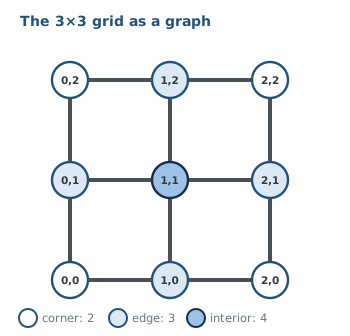
A corner has 2 neighbors, an edge node 3, an interior node 4.
On a 3×3 grid, how many neighbors does the interior node (1,1) have?
On paper, an X was never numbered and never anyone's neighbor. In the graph that means a blocked intersection is removed: the node and all its edges. Block (1,1):
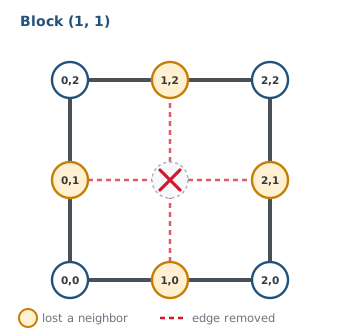
Blocking one node changes its neighbors too: (0,1), (1,0), (1,2) and (2,1) have each lost one. That's the second half people forget, and it matters: a search that still sees an edge into (1,1) will happily step into the wall.
After (1,1) is blocked, how many neighbors does (0,1) have?
This lesson's skeleton
A new section for a new kind of data. Paste it into robot.py above RUN, after the
NAVIGATOR section. Like the MANHATTAN PLANNER, nothing in it drives.
# ===== GRID GRAPH =====
# The grid as a graph, in a dictionary: every intersection is
# a key, and its value is the list of neighbors it is joined
# to. The BFS PLANNER searches this graph. Starts with the
# open grid; Lesson 5-4 adds the blocked list, so a blocked
# intersection is neither a key nor anyone's neighbor.
ROWS = 4                 # the grid is ROWS x COLS intersections
COLS = 4

def build_grid_graph(rows, cols):
    """Return the open grid as a dictionary: every (x, y)
    maps to the list of its on-grid neighbors."""
    pass
ROWS and COLS are the size of your taped grid. The function takes the size as
parameters, so you can build a small 3×3 while the settings say 4×4.
Activity · Build the graph, one piece at a time
You will grow build_grid_graph() in six small steps. Each one prints something, so
before every run write down what you expect to see, then run it and compare. While you
work, set the run line to
build_grid_graph(3, 3)
so it builds a 3×3 grid, small enough to check by eye. The robot stays on the desk.
Step 1 · Visit every intersection
Replace pass with two for loops, one inside the other: the outer one over every x
(range(cols)), the inner one over every y (range(rows)). Inside, print the
intersection (x, y).
Before you run it: how many lines will print, and which number changes fastest, x or
y?
Step 2 · List every neighbor
Inside the inner loop, make an empty list called neighbors and append the four
intersections next to (x, y): left, right, down, up, in that order (the order Lesson
5-1's trace used, so your program's paths will match the paper ones). Then print the
intersection followed by its list.
Before you run it: what will (0, 0) print?
Look at your output. Every intersection got four neighbors, but the graph figure above says a corner has only 2. Circle every neighbor in your output that isn't really there. What do they have in common?
Step 3 · Throw out the ones off the grid
A neighbor is off the grid when one of its numbers is below 0 or past the last row or
column. Put an if in front of each append, so each neighbor is added only when it is
on the grid. Each direction needs its own test, and each test compares just one number.
Before you run it: how many neighbors should a corner, an edge and the middle have?
Step 4 · Keep them in a dictionary
Printing the neighbors is how you check them. BFS needs to keep them, and look them
up later by intersection: "what are the neighbors of (1, 1)?" A list can't do that; it
finds things by position (path[0]), not by what they are. Python's tool for looking up
by name is the dictionary.
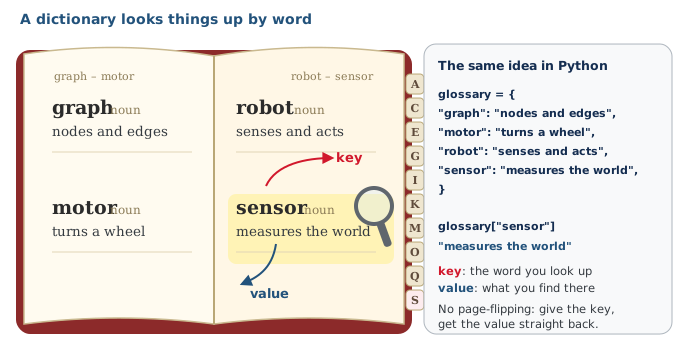
The syntax is all you need:
graph = {}                         # an empty dictionary
graph[(0, 0)] = [(1, 0), (0, 1)]   # store: key (0, 0), value a list
print(graph[(0, 0)])               # look up: [(1, 0), (0, 1)]
print(len(graph))                  # how many keys: 1
A key must be something that can't change, like a number or a tuple, so an (x, y)
tuple works.
Now change your function:
- make
graph = {}before the loops - replace the print inside the loop with a line that stores
neighborsunder the key(x, y) - after the loops (not inside them), print
len(graph), then the neighbors of(1, 1), then the neighbors of(0, 0)
Before you run it: what three lines will print?
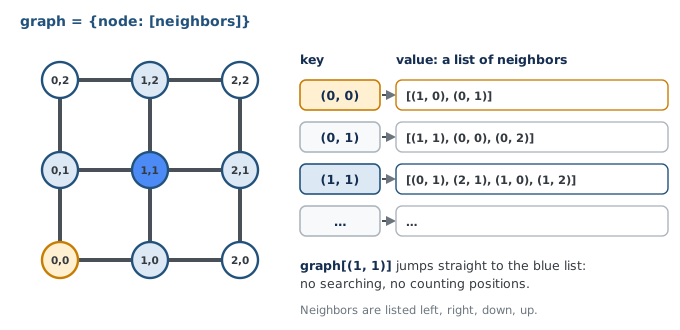
In our graph dictionary, what are the keys and what are the values?
Step 5 · Hand the graph back, and test it
A function that only prints is no use to BFS; it needs the graph itself. Delete the three
prints, end the function with return graph, and write test_grid_graph(): build the
4×4 graph from ROWS and COLS and print the same three things. Set the run line to
test_grid_graph().
Then end the test by printing the whole graph, one intersection per line. A for loop
over a dictionary hands you each key in turn, and the key looks up its value:
for node in graph:
    print(node, graph[node])
Before you run it: which of the first three lines change on a 4×4? How many lines does the loop print, and how many of them should have exactly 2 neighbors?
Step 6 · Ask whether a key is there
Add these to the end of test_grid_graph() and predict each line before you run it:
print((3, 3) in graph)
print((4, 4) in graph)
print(graph[(4, 4)])
BFS uses in all the time. Its numbers will be a dictionary too, called distance:
each intersection is a key, and its steps to the destination is the value. "Does this
neighbor have a number yet?" is then one in. You will write it in Lesson 5-5.
Given distance = {(2,2): 0, (1,2): 1}, what does (1,2) in distance return, and what does it mean?
Real-world connections
Road maps
A navigation app stores the streets as a graph: intersections are nodes, roads are edges, and a closed road is an edge taken out.
User profiles
A username maps to a profile: any user, found instantly by key.
Inventories
Item name maps to quantity: "how many potions?" with no searching.
Wrap-up
- What does the program need to remember that a list can't look up easily? (Things found by intersection: its neighbors, and its number.)
- What are a node, an edge, and a neighbor? (A point, a link between adjacent points, and the points a node links to.)
- What does blocking a node remove? (The node and all its edges, so it is nobody's neighbor.)
- How is a dictionary different from a list? (Looked up by key, not by position.)