Lesson 5-7 · Obstacle Detection with the Rangefinder
Lesson 5-7 · Obstacle Detection with the Rangefinder
Teacher mode is on. Toggle it off (bottom-right) to preview the student view.
Until now you filled in the blocked list by hand, in a test. Today the robot fills it
in itself with the ultrasonic rangefinder: look before you drive, and if something is
there, call add_blocked() (the call your tests made) and re-plan. The planner doesn't
change. This opens the last section of robot.py: OBSTACLES.
Learning Objectives
By the end of this lesson you will be able to:
- Add the rangefinder to the start of
robot.pyand read a distance - Explain how an ultrasonic rangefinder measures distance
- Use a threshold to decide whether the intersection ahead is blocked
- Say which intersection a reading refers to, and why the path already tells you
- Write a driving test: Module 4's
drive_path()loop plus one rangefinder check that re-plans, first with a simulated sensor, then the real one
The robot gets eyes
The rangefinder sends out a sound pulse, too high for us to hear, and times the echo. The round-trip time gives the distance to an object, in centimeters. Reading it takes three lines:
from XRPLib.rangefinder import Rangefinder

rangefinder = Rangefinder.get_default_rangefinder()
distance = rangefinder.distance()      # float, in cm
The first two lines go in the start block at the top of robot.py: the import
under the other XRPLib imports, the object under board = .... Then every function
can use rangefinder the way it uses drivetrain.
How does an ultrasonic rangefinder measure distance?
Choosing a threshold
Readings are noisy: they vary a little each time. So don't check for an exact distance; use a threshold. Measure with the next intersection blocked (say ~12 cm) and clear (say ~50 cm), then pick a cutoff between them:
if distance < OBSTACLE_CM:
    print("OBSTACLE DETECTED")
else:
    print("Path is clear")
It's OBSTACLE_CM, not THRESHOLD, because the file already has a reflectance
THRESHOLD from Lesson 2-2. Two settings with one name is a bug waiting to happen.
Why use a threshold instead of checking for an exact distance?
This lesson's skeleton
Paste this into robot.py above RUN, after the BFS PLANNER section. Like the
NAVIGATOR, it drives, so its tests wait for the button twice.
# ===== OBSTACLES =====
# The robot fills BLOCKED itself. Before each step of a path
# the rangefinder looks at the intersection ahead; if there is
# something, add_blocked() tells the BFS PLANNER (the call the
# 5-6 harness made) and a new path is planned from where the
# robot stands. Facing and driving are the NAVIGATOR's job.
OBSTACLE_CM = 15                         # closer than this = blocked
SIMULATED_OBSTACLES = [(2, 0), (2, 2)]   # pretend obstacles, for a dry run

def simulate_rangefinder(next_pos):
    """Stand-in for rangefinder.distance(): 8.0 if next_pos is
    in SIMULATED_OBSTACLES, otherwise 50.0."""
    pass
Two tests go under it, both yours to write. The second one's outline is below.
Which intersection is blocked?
A short reading means something is ahead, but which intersection? The one directly in
front of the robot, and the loop already knows it. Look at Module 4's drive_path()
loop:
for next_pos in path:
    desired_heading = get_desired_heading(current_position, next_pos)
    current_heading = turn_to(current_heading, desired_heading)
    track_to_intersection()
    current_position = next_pos
After turn_to(), the robot is facing next_pos. So a short reading right then means
next_pos is blocked. The path already told you.
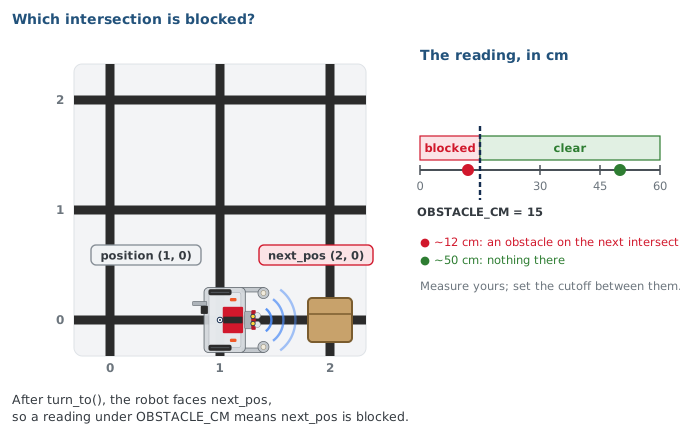
The robot is at (2,1), has just turned to face the next step on its path, (1,1), and the rangefinder reads 8 cm. Which intersection is blocked?
The loop: Module 4's, plus one check
Today's driving test is drive_path()'s loop with one step added between turning and
driving: look ahead. Write it as test_detect_once() under the skeleton:
def test_detect_once():
    # robot at (0, 0) facing North; destination (3, 3)
    # plan the path, print it, wait for the button
    # for each next_pos in path:
    #     face it: get_desired_heading(), then turn_to()
    #     NEW: look ahead -- distance = simulate_rangefinder(
    #          next_pos) for now; rangefinder.distance() later
    #     print position, HEADING_NAMES[heading], the distance
    #     if distance < OBSTACLE_CM:
    #         tell the planner: add_blocked(next_pos); say so
    #         new path from HERE: compute_bfs_path(position,
    #             destination); print it; then break
    #     else:
    #         arrive: track_to_intersection();
    #         position = next_pos
    # print the blocked list
    pass
And the new branch, the one piece that isn't Module 4's drive_path():
        if distance < OBSTACLE_CM:
            add_blocked(next_pos)
            print("Obstacle at", next_pos, "! Rerouting...")
            path = compute_bfs_path(position, destination)
            print("New path:", path)
            break      # Lesson 5-8 keeps going instead
Three things to notice.
add_blocked(next_pos)is the same call your Lesson 5-6 harness made. The planner can't tell a sensor from a test script, so passing those tests means the robot will re-plan correctly.- Re-planning is one line, from where the robot is:
compute_bfs_path(position, destination), Rule 1 from Lesson 5-4. The planner rebuilds its graph fromBLOCKEDevery call, so there is no "rebuild the graph" step to forget. - The robot is parked when it re-plans. Every track ends with its center on the cross, so it is still on the intersection it re-planned from.
The break ends the loop once a new path is planned: today the robot re-plans once and
stops. Lesson 5-8 replaces it with "follow the new path until you arrive."
If you built the LineTrack or Navigator class, the driving calls in the outline
are tracker. or navigator.line_track. calls, as in Lesson 4-6, and the planner
calls are planner.add_blocked() and planner.compute_path().
When the robot detects a new obstacle, what does it do to reroute?
Why does the robot not need a separate 'rebuild the graph' step after add_blocked()?
Print the plan before the button
The outline starts with a new habit: plan and print the path, then wait for the button before the robot moves.
    path = compute_bfs_path(position, destination)
    print("Planned path:", path)

    board.wait_for_button()
Read the path before you press. If it's right and the robot still goes wrong, the bug
is in the driving, not the planner. That makes two presses per driving test: the one in
RUN prints the plan, the one in the test is go.
Activity · Read, simulate, then drive
Step 1 · The sensor
- Add the import and the object to the start block.
- Write
test_rangefinder(): printrangefinder.distance()fifty times, a tenth of a second apart, astest_sensors()did in Lesson 2-1. Set the run line to it. - Hold an obstacle in front of the robot at the distance of the next intersection, then take it away. Write both readings down.
- Check that
OBSTACLE_CMsits between them; change it if not.
Step 2 · Simulate the sensor
- Write
simulate_rangefinder(), one line:8.0ifnext_posis inSIMULATED_OBSTACLES, otherwise50.0. - Write
test_detect_once()from the outline, with the simulated sensor in the look-ahead line. - Put the robot at
(0, 0)facing North on an empty grid and set the run line to it. Before the second press, check that(2, 0)is on the planned path. - It should face East, drive to
(1, 0), face(2, 0), "see" the pretend obstacle, print the new path, and stop. Check that the blocked list has grown and the new path goes around.
Only the sensor is simulated; the planner was already tested in Lesson 5-6. So a wrong reroute here is a code bug, not a hardware bug.
Step 3 · The real sensor
Change the look-ahead line to rangefinder.distance(). Put an obstacle on the printed path
((2, 0) again works) and press the button. The robot should stop, print
"Rerouting..." and the new path, and stop. Taking the new path is next lesson.
Why test with a simulated rangefinder before using the real one?
Real-world connections
Sense → decide → act is the loop behind every autonomous machine:
Self-driving
Radar and LIDAR detect obstacles; the planner reroutes in real time, just like this loop.
Fulfillment robots
Robots sense blocked aisles and replan paths on the fly to keep goods moving.
Mars rovers
Rovers scan the terrain ahead and reroute around rocks they can't cross.
Wrap-up
- What three lines read the rangefinder? (Import,
get_default_rangefinder(),.distance().) - Which intersection does an obstacle reading refer to? (
next_pos: the robot just turned to face it.) - What is the one line that tells the planner? (
add_blocked(next_pos), the same one the tests used.) - Why no "rebuild the graph" step? (The planner rebuilds from
BLOCKEDon every call.)