Lesson 5-9 · Capstone Project
Lesson 5-9 · Capstone Project
Teacher mode is on. Toggle it off (bottom-right) to preview the student view.
This is it: every piece you've built, in one autonomous system. The robot visits several destinations, plans with BFS, senses obstacles, reroutes on the fly, and starts the next run knowing what this one found. You won't write much new code. The challenge is integration: making working parts work together.
Learning Objectives
By the end of this project you will be able to:
- Integrate the BFS planner, Module 4's driving toolkit and rangefinder detection into one program
- Visit four or more destinations while detecting and avoiding obstacles
- Start a run from the obstacles a previous run discovered, and report what this one found
- Demonstrate learning: Run 2 outperforms Run 1, with numbers to prove it
- Debug integration issues: parts that work alone but not together
The mission
Your robot is an autonomous delivery vehicle. It visits four or more grid destinations
in order. For each leg it plans a path, drives it while watching for obstacles, and
reroutes whenever the rangefinder finds one. Everything you need is already in
robot.py, from Lessons 5-4 to 5-8. Today you connect them.
You'll demonstrate with two runs:
- Run 1 starts with an empty blocked list, discovers obstacles the hard way, and prints what it found.
- Run 2 starts with that list typed in, so it plans around them and reroutes less.
The drop in steps between runs is the learning.
What is the main challenge of the capstone?
This lesson's skeleton
Paste this at the end of the OBSTACLES section, above RUN. Nothing new is defined:
one setting, a paper test that prints every leg's path without moving the robot, and the
project itself, which is a test function like every program in this course.
# --- Lesson 5-9: capstone, the delivery run ---
# The module project: visit CAPSTONE_DESTINATIONS in order,
# each leg with navigate_with_detection(), starting from what
# the last run found (KNOWN_OBSTACLES) and printing what this
# run found for the next one. Nothing new is defined; the
# sections above did the work, and this test connects them.
CAPSTONE_DESTINATIONS = [(1, 3), (3, 3), (3, 0), (0, 0)]

def test_capstone_paper():
    # no robot: hand KNOWN_OBSTACLES to add_blocked(), then
    # from (0, 0) plan each leg with the BFS planner, print it
    # with its step count, and move position on to that
    # destination for the next leg
    pass

def test_capstone():
    # 1. hand KNOWN_OBSTACLES to add_blocked()
    #    (empty on Run 1, last run's list on Run 2)
    # 2. position (0, 0), heading 0; both totals at 0
    # 3. print the plan for leg 1; wait for the button
    # 4. for each destination, with its leg number:
    #        navigate_with_detection() -- plan, follow,
    #        re-plan until arrived (Lesson 5-8)
    #        ... keeping position and heading up to date
    #        add its steps and reroutes to the totals
    # 5. print the blocked list -- what you type in next run
    # 6. print the totals: steps, reroutes
    pass
The name is CAPSTONE_DESTINATIONS because Module 4's test_delivery() still reads
DELIVERY_STOPS, and a finished section is not edited from another one.
The blocked list is the thread tying it together: step 1 fills it, the planner
reads it on every call, detection adds to it, and step 5 hands it to the next run. Every
addition goes through add_blocked(), so the planner never knows which source it came
from.
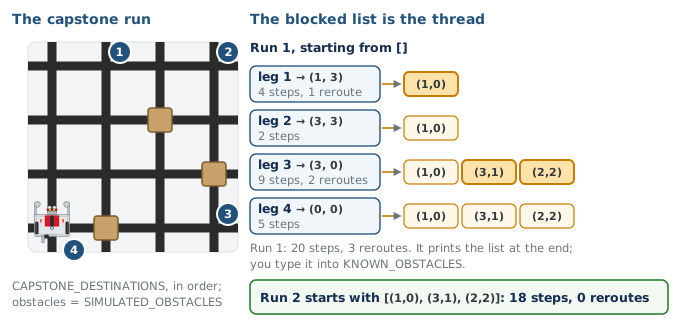
What single data structure connects the start of the run, pathfinding, detection, and what you carry into the next run?
The destination loop
navigate_with_detection() (Lesson 5-8) already handles one trip. The new code is a
loop that calls it once per destination, feeding each trip's end pose into the next.
The call is the one from your Lesson 5-8 test, with the leg's destination:
        position, heading, steps, reroutes = navigate_with_detection(
            position, heading, dest, rangefinder, OBSTACLE_CM
        )
Two details are easy to get wrong:
- Assign the pose (
positionandheading) from the return value. Forget theposition, heading, ... =part and leg 2 plans from (0, 0) while the robot sits somewhere else. - Print only the first leg before the button. Later legs are planned from wherever the robot actually ends up, around obstacles it hasn't found yet.
With the Navigator class there is no position, heading, ... = line: the method
updates navigator.position and navigator.heading itself and returns the two counts.
With the BFS class, the planner calls are planner.compute_path() and
planner.add_blocked(), and you print planner.blocked at the end.
Why can the program print the plan for leg 1 before the button, but not for legs 2 to 4?
A team's robot drives leg 1 correctly, then on leg 2 turns the wrong way and tracks off the grid. The most likely cause?
Activity · Test in three levels
Do not jump straight to the full run: if something breaks, you won't know which piece. Build up, one test on the run line at a time:
- Planner alone (no robot). Write
test_capstone_paper()from its outline and set the run line to it. It is Module 4's on-screen run on today's destinations with the BFS planner: the four paths on screen, with their step counts, planned around whatever is inKNOWN_OBSTACLES. On Run 1 that list is empty; type in a pretend one and run again to see the legs bend around it. - Dry run on the grid. Write
test_capstone()from its outline. Put the simulated sensor innavigate_with_detection()'s look-ahead line (Lesson 5-8, step 1) and setSIMULATED_OBSTACLES = [(1, 0), (2, 2), (3, 1)], three intersections the paper paths cross. No obstacles on the grid. Check that paths compute, pretend obstacles register, the blocked list grows across all four legs, and the final list is the one to start the next run with. - The real thing. Put the look-ahead line back to
rangefinder.distance(), put obstacles on the grid, and run twice: Run 1 withKNOWN_OBSTACLES = [], then Run 2 with the printed list typed in.
Watch for the classic integration bugs:
- The blocked list reset between destinations. One
BLOCKEDserves the whole run: never callclear_blocked()between legs. positionandheadingnot assigned from the return value.- A destination that is itself in
KNOWN_OBSTACLES: the planner returns[]and the leg is skipped with "No path".
Which is a classic capstone integration bug to watch for?
The rubric and demo
You're graded on the integrated system, component by component:
| Category | Points | What it takes |
|---|---|---|
| BFS pathfinding | 10 | Correct shortest paths; the Lesson 5-6 tests pass |
| Driving integration | 10 | Robot physically drives the computed paths, leg after leg |
| Obstacle detection | 10 | Rangefinder detects and add_blocked() updates the list |
| Re-planning | 10 | Reroutes correctly around discovered obstacles |
| Experience | 10 | Run 1 prints what it found; Run 2 starts from that list |
| Demonstration | 5 | Run 1 discovers & reroutes; Run 2 avoids known obstacles |
| Code quality | 5 | Readable, uses functions, meaningful comments |
For the demo, run twice and have your numbers ready: "Run 1 took X steps with Y reroutes; Run 2 took A steps with B reroutes."
Finished early? Try an extension:
- Visit the nearest destination next.
- Obstacle expiration: re-check old obstacles after a few runs.
- A
print_grid()map of the distances after each leg. - If you did the class extensions: a
Navigatorobject that ownspositionandheading, so the destination loop has nothing to pass back and forth.
In the demo, what evidence shows the robot 'learned'?
Real-world connections
You've built, in miniature, what real autonomous systems do:
SLAM
Real robots build and reuse maps of their surroundings: the grown-up version of your obstacle memory.
Self-driving
Sense, plan, act, and learn from fleet data: the same loop at massive scale.
System integration
Connecting tested components into a reliable whole is the core of professional software work.
Wrap-up
- What connects all the components? (The blocked list: filled at the start, planned from, added to on detection, printed for the next run.)
- Why test in simulation before the robot? (Separate logic bugs from hardware bugs.)
- What proves the robot learned? (Run 2's measured improvement over Run 1.)