Module 6 · Dijkstra's Algorithm (Optional)
The Same Algorithm, One Upgrade
Teacher mode is on — the gray boxes are yours only. Flip the switch (bottom-right) to preview the student view.
Module 5 ended with a robot that finds its own way around blocked intersections. It uses breadth-first search, which finds the path with the fewest steps, and on a grid where every block takes the same time, that is also the fastest path.
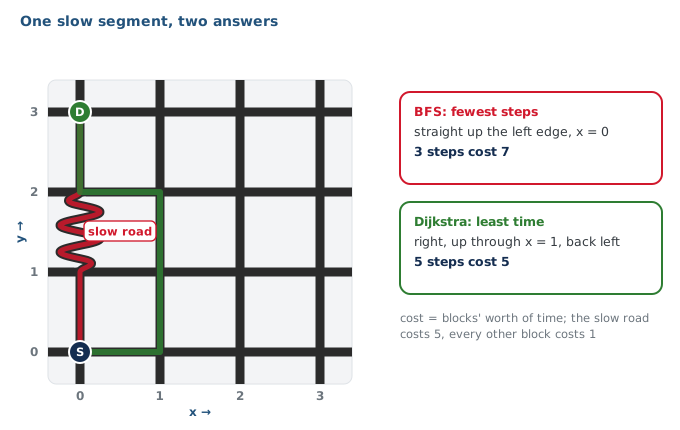
But what if one block doesn't take the same time? Suppose one segment of the grid takes a long, winding detour between two intersections, so that driving it takes as long as five ordinary blocks. The map still says it's one step. BFS will happily send the robot down it, because BFS only counts steps.
This module fixes that. Dijkstra's algorithm is your BFS with two changes, and it finds the path that takes the least time, not the fewest steps.
Learning Objectives
By the end of this module you will be able to:
- Measure a slow segment and turn it into a number: its weight
- Add a cost check to the Module 5 test harness, and show BFS failing it
- Turn your
compute_bfs_path()intocompute_dijkstra_path()by making two changes to a copy - Read a cost grid and explain every number on it
- Run three planners through one harness and say exactly where they agree and disagree
What this module is not
It is not a new kind of programming. There is no new Python syntax in it. The graph,
add_blocked(), the previous dictionary, the walk-back and the harness are all
the ones you built in Module 5, in the same robot.py — the harness gains one case,
and the file gains two sections above RUN: WEIGHTED GRAPH and DIJKSTRA PLANNER. The
two changes are in the middle of one function:
- Take the closest intersection off the to-visit list instead of the oldest one.
- Add the segment's weight instead of counting one step, and keep the cheaper total if you reach the same place a second time.
That's it. The rest of the module is about seeing why those two changes matter.
The lessons
| Lesson | What happens |
|---|---|
| 6-1 · When Fewest Steps Isn't Fastest | Time a normal block and the slow segment with a stopwatch. Work out, on paper, which of two routes is really faster. |
| 6-2 · Weights in the Graph | Start the WEIGHTED GRAPH section: the slow list, weight(), path_cost() and a cost check. Run the check on BFS — and watch it fail. |
| 6-3 · From BFS to Dijkstra | Start the DIJKSTRA PLANNER section: copy your BFS, rename it, make the two changes. Print the cost grid. Run Manhattan, BFS and Dijkstra through the same harness. |
| 6-4 · Drive It | The robot on the slow-segment grid: a BFS run, then a Dijkstra run, one test and one changed name. |
| 6-5 · Three Planners, One Harness (optional extension) | The Dijkstra class, and all three planners as objects through the Module 5 class harness. |
On a grid where every segment takes the same time, how do BFS and Dijkstra's algorithm compare?