Lesson 6-1 · When Fewest Steps Isn't Fastest
Lesson 6-1 · When Fewest Steps Isn't Fastest
Teacher mode is on. Toggle it off (bottom-right) to preview the student view.
Module 5's planner finds the path with the fewest steps, and on your grid so far that has always been the fastest path too — every block took the same time. Today one block doesn't. Your teacher has changed one segment of the grid so the tape takes a long detour between two neighboring intersections. The map still says one step. Your robot will take a lot longer than one step to drive it. This lesson is about measuring that, and turning it into a number the planner can use.
Learning Objectives
By the end of this lesson you will be able to:
- Explain why the shortest path in steps is not always the fastest in time
- Time a normal block and the slow segment with a stopwatch, and turn the ratio into a weight
- Add up the cost of a route by hand, with and without the slow segment
- Predict which of two routes BFS will choose, and whether it is the faster one
- Say why a slow segment that costs exactly three blocks is not slow enough to matter
The grid has a slow road
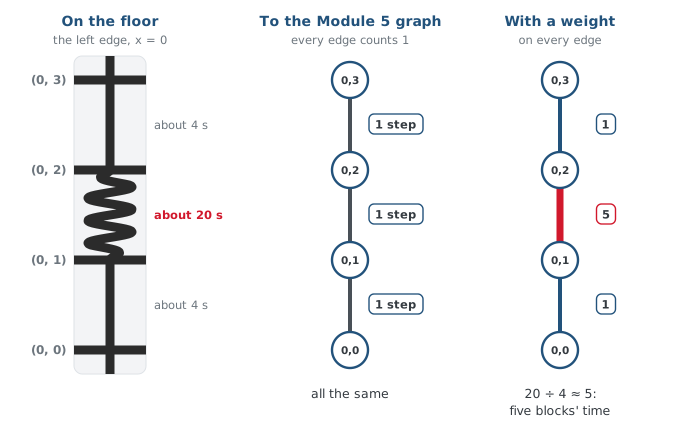
Look at the grid. One segment between two adjacent intersections is no longer a straight piece of tape — it winds back and forth before it arrives. Line following still works on it; the sensors don't care that the tape wiggles. But the robot has to drive the whole length of the wiggle.
To the Module 5 graph, that segment is still one edge: (0, 1) is a neighbor of
(0, 2), full stop. build_graph() has no way to say "this neighbor is far." And
compute_bfs_path() counts edges. So from (0, 0) to (0, 3) it will pick the straight
run up the left edge — three steps — and send the robot along the slow road, every time.
Why does compute_bfs_path() choose the slow road without hesitation?
Activity · Measure it
A planner needs a number, not "it's slow." Get one with a stopwatch:
- Time the robot driving one normal block, intersection to intersection, with
track_to_intersection(). Do it three times and average. - Time the robot driving the slow segment the same way, three times, average.
- Divide: slow time ÷ normal time. That ratio is the segment's weight — how many normal blocks' worth of time it costs.
Normal block:   4.1 s   4.0 s   4.2 s    average 4.1 s
Slow segment:  19.8 s  20.5 s  20.1 s    average 20.1 s

weight = 20.1 / 4.1 = 4.9  -> call it 5
Round to a whole number. The planner doesn't need two decimal places; it needs to know that this edge is about five times worse than the others. Write your weight down — Lesson 6-2 types it into the program.
A normal block takes 4 seconds and the slow segment takes 16. What is its weight?
Cost on paper
Now compare two routes from (0, 0) to (0, 3) on a 4×4 grid, with the slow segment between (0, 1) and (0, 2) at weight 5. A route's cost is the sum of its edge weights — 1 for a normal block, 5 for the slow one.
Route A, straight up the left edge (x = 0):
  (0,0) -> (0,1) -> (0,2) -> (0,3)
  cost =    1   +    5   +    1    = 7       (3 steps)

Route B, right, up through x = 1, and back:
  (0,0) -> (1,0) -> (1,1) -> (1,2) -> (1,3) -> (0,3)
  cost =    1   +    1   +    1   +    1   +    1    = 5       (5 steps)
Route A has fewer steps. Route B is faster. BFS picks A.
With the slow segment at weight 5, which route does BFS choose from (0,0) to (0,3), and what does it cost?
Why three isn't enough
Try the same comparison with the slow segment at weight 3. Route A costs 1 + 3 + 1 = 5. Route B still costs 5. They tie — and going round one segment on an open grid always takes exactly three normal blocks, so a weight of three is the break-even point. For the two planners in this module to disagree, the slow segment has to be clearly worse than the detour around it: a weight of 4 or more. If your stopwatch gave you 3, ask your teacher to make the detour longer.
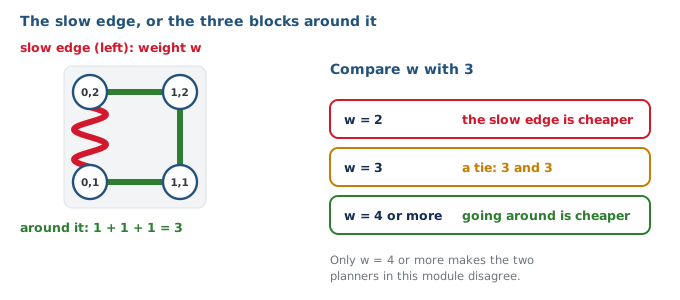
The slow segment measures weight 3. From (0,0) to (0,3), what happens?
Real-world connections
Every real router works in time or cost, not hops:
Fastest, not shortest
A map app's route is rarely the fewest turns or the fewest miles; it is the least time, with each road weighted by its speed.
Link costs
Internet routers weight links by bandwidth and delay; a path with more hops over fast links beats a short path over a slow one.
Toll roads and traffic
Delivery routing adds tolls, traffic and loading time to distance. The cheapest route is the one with the smallest total.
Wrap-up
- What does a weight mean? (How many normal blocks' worth of time a segment costs.)
- How do you get one? (Time the slow segment, divide by a normal block, round.)
- What is a route's cost? (The sum of its edge weights.)
- Why isn't weight 3 enough? (The detour around one segment is 3 blocks; it ties.)